Tuesday, August 12, 2014

Experience The Future of Technology!!!

Technology is robust it gets updated every "nano second" I can say in every corner of the world and in Today's technology driven world we need to stay up to-date on what is happening now and what is yet to come to get prepared for experiencing the new innovations. I wrote this post today after reading the latest Citrix CTO article which amazed me and wanted to share this to you to join with me to a joyful journey of how our World will be in the next 5 years with the advancement of the Technology in various fields. This is a great read for you to gain an experience that you never imagined and an opportunity to see the future.


Below is the synopsis:

Each year at Citrix, we create a five-year vision of where technology is headed and its impact on people and society. The theme of last year’s technology landscape was Insights for Inspiration. This year’s landscape theme is the Joie De Vivre, which in French has two meanings:

1. Joy of Life
2. Self-Actualization


We want to help companies and individuals reach their ultimate potential. This year we will provide an update on unfolding trends, explore the future of work, and explore the future of life.

Top Icons for the chapters


Download from Slideshare here: Citrix CTO Office 2019 Technology Landscape


Thursday, August 07, 2014

Exchange Online Throttling Policy Overview

Throttling is not a new term for Exchange Administrators as this is a key feature we configure to tweak the environment performance by controlling how the clients consumes the resources. If you are an On premises Exchange customer its easy for you to configure these limits and modify them according to your needs when requirement changes but, If you are an Office 365 customer using Exchange Online then this becomes impossible from your end as this is a limit set by Microsoft and you no longer have control over it.


I write this post today to reference two vital articles available on the topic. You will normally experience the effect of throttling while executing some powershell cmdlets or scripts using remote powershell connected to Exchange Online. You will see some delay in execution of each result and also some times you'll get the ""Micro delay applied" warning. Microsoft team says this is due to the Throttling policy set in Exchange Online by design, and this below Knowledge base article is based on this warning, this article also says that you can contact support and increase the value with proper business justification.

Check here: "Micro delay applied" warning or delays when you run scripts and cmdlets in Exchange Online

Though this KB article outlines the issue cause and workaround it is not complete, we still miss some important part which is covered by MVP Alan Byrne on his below Blog post from Cogmotive.com. The information he shares here on the topic is quite useful and you need to review and use it as a guideline when working with Exchange Online using remote powershell and even I felt this personally useful when my scripts are throttled by the service.

Read here: Exchange Online PowerShell Throttling in Office 365

Its not powershell alone that is getting throttled, we have other services too like EWS and MAPI which occupies the other major part and to know more on this review the below Exchange Dev Blog post from Microsoft.

Read here: Exchange Online Throttling and Limits FAQ

Understanding Throttling policy is really useful when you configure your environment with Office 365 to know the limits set on the service and make sure you use the resources inline with that limit, Also keeping one thing in mind that we cannot change these limits as we used to do normally and  from my experience its not easy to get it modified through Microsoft support. I have added this crucial topic to my Office 365 section now along with other vital posts.

Tuesday, August 05, 2014

Microsoft Cloud Ecosystem Poster

Microsoft team released a new Cloud Ecosystem Poster today, Review this poster to know the features of Microsoft Azure, System Center 2012 R2 and Window Server 2012 R2.

This poster is a visual reference for understanding key Microsoft Private Cloud and On-premises Cloud. technologies

 
Downlaod here:  Cloud Ecosystem Poster: Microsoft Azure, Windows Server 2012 R2, System Center 2012 R2

Sunday, August 03, 2014

Office 365 Availability and Performance Monitoring

How good are your monitoring your Office 365 Environment for High availability? is a question asked at various instances to an Office 365 Administrator since this is quite different from the traditional On premises monitoring as we rely more on Microsoft Cloud services in comparison with our own resources in a fully hosted scenario and we rely on both in a Hybrid environment.


Microsoft Office 365 Dashboard provides you updates over various service degradation, performance issues and outages as and when they occur, but most of the time it is not updated immediately for your visibility. Whenever there is an issue reported, Microsoft team needs to have proper update in hand before they update the Dashboard and also they will update it only for issues that's  impacting customers on a large scale and you will get more information in scenarios on which they confirmed the issue is from their service end, else the issue will become false positive.

You can subscribe for Office 365 Service Health RSS Feeds to get the service health updates directly to your Inbox for quick review.

This post is written with respect to Monitoring Messaging Environment and applies to both fully hosted and Hybrid deployment with Office 365 some components like Dirsync, ADFS are in common for other Online services.

Monitoring Office 365 Synthetic transactions is quite vital to determine the performance and availability of the service and we have few great vendors who provide this service in the market like Exoprise, Agile IT, Mailscape (Enow software)  etc. all of these are good options providing advanced functionality but, most of the customers prefer to use their in house tools already adopted for monitoring the environment and most common one is SCOM.  Microsoft team recently released their new management pack for monitoring Office 365 for System Center 2012 R2 along with Office 365 Service communication API that allows you get real time updates on Service Availability from Microsoft.

More information is available here: New Office 365 admin tools

Availability of other resources is quite critical when you use Office 365 in a Hybrid environment where your Monitoring task expands across both your On premises and Cloud Organization unified as one, Most of the Large Enterprise customers use Office 365 Hybrid with SSO using ADFS and some customers prefer Dirsync Password hash for same sign-on.

When we go for Hybrid as stated earlier every component involved in the setup is critical, It begins with your Network devices, firewall and proxy which underlines the connectivity  between your environment to the cloud, you can refer my earlier blog post "Troubleshooting Outlook Connectivity and Performance issues with Office 365"and review few important articles I referenced to know how good you need setup and monitor these key resources, even this applies to your fully hosted environments with Office 365.

Next its your Hybrid servers these servers availability are crucial for your Org relationship to work and mail flow between both the environments. Most Organizations use two or more Hybrid servers for high availability and if you use loadbalancer ensure that its highly available too. Monitoring this comes as part of your On premises Exchange server monitoring, ensure that you put additional care over these servers and take necessary action on time when you get a alert or alarm before it breaks and impacts the environment.

Next comes your Dirsync server, I put this one before ADFS because this is the most simplified way of achieving same sign-on experience for users, With Dirsync Password hash users can have same password across On premises and Office 365 with out any additional server requirement. Organizations who need same sign-on alone and doesn't require any complexity or enhanced security except password protection this is the prominent solution. We can use Only one active Dirsync server at a time for directory synchronization and you can still have a standby server to take up the active role in cause of primary server failure. Ensure that you install Dirsync on a separate highly available server, its still supported to install on a Domain controller but having it as a separate standalone box is advisable and ensure that you monitor this server availability as you regularly monitor other servers. Though this server is down you will not have a huge impact because Synchronized objects will still continue to work and new changes made to the existing object along with newly created objects in On premises will not sync to cloud until this server comes live which will cause issues at some point, This is crucial if you enable password hash because users will not be able to use their new password once changed in on premises for accessing cloud applications before it gets synched.

Up next is your ADFS Servers, When you decide to adopt federated Identity your ADFS server becomes a very Critical component on the entire setup, Organizations that require true SSO with complex requirements, enhanced security and control over user access adopt this model, When you go for ADFS you need to implement ADFS internal servers and ADFS proxy servers and some Organizations use TMG in place of ADFS proxy servers, With the latest deployments where Organizations use ADFS 3.0 we have some new benefits and ADFS proxy servers are replaced by Web Application Proxy (WAP) which comes a part of Windows Server 2012.

ADFS server farm is created with multiple servers both internally and externally with traditional ADFS 2.0 based deployment for high availability, When you decide to have multiple ADFS servers in the environment you can use SQL server instead of WID and go for SQL server high availability. Monitoring these servers can be achieved by your own traditional monitoring tools like SCOM. Having a highly available ADFS Infrastructure ensures that your environments stays highly available to end users most of the time.

One more to add is your Smart hosts, some Organizations still use Smart hosts with in the Hybrid mail flow, Microsoft doesn't recommend this per design guideline and if you still use one then ensure that server is monitored well for High availability.

Use Remote Connectivity Analyzer test for Office 365 to test how well your environment is setup with the service, this is the best tool per my knowledge that shows you how things are setup and the first tool that helps to identify potential issues in time with simple steps for corrective action.

Check here: Microsoft Remote Connectivity Analyzer

Finally, Ensure that you use Supported Clients in your environment to access the service inline with Office 365 System Requirements and if you still have unsupported clients within the environment you will have performance issues which is inevitable and also stay in an unsupported scenario, you can know more on this by reviewing  my blog post above on troubleshooting outlook connectivity. Monitoring this can be achieved by using various scripts available in the community which assists you in analyzing the type of clients and operating system used within the environment and also the new reports included to the Office 365 reports collects this information proactively and provides this data for our action.

I tried to cover the critical components in a nutshell, which you need to monitor effectively in your environment everyday and I will update this post as and when I get some new information on the topic. Stay tuned...

Update:

Microsoft team recently released few great tools for Monitoring Office 365 Service health status, review the below Office Blogs post to know more

Review here : New Office 365 admin tools

One more below,

Client library for Office 365 admin reporting web service now available

Thursday, July 31, 2014

Learn SharePoint Using Microsoft Office Interactive Content Pivot!!!

Microsoft team published the Microsoft Office Interactive Content Pivot that helps you to learn SharePoint Server 2013 and related contents from a single Interactive window that provides you access to all the available Technical content from TechNet and Office.com and you have options to filter your search with regard to your Job role, Technical subject etc., I recently came across this excellent guided study guide and writing this post today to share the same with you.


More information is available in the below TechNet blog

Introducing the Microsoft Office Interactive Content Pivot


Access the Content here: Microsoft Office Interactive Content Pivot

Use the Microsoft Office Interactive Content Pivot Help to check how to access the contents.

Tuesday, July 29, 2014

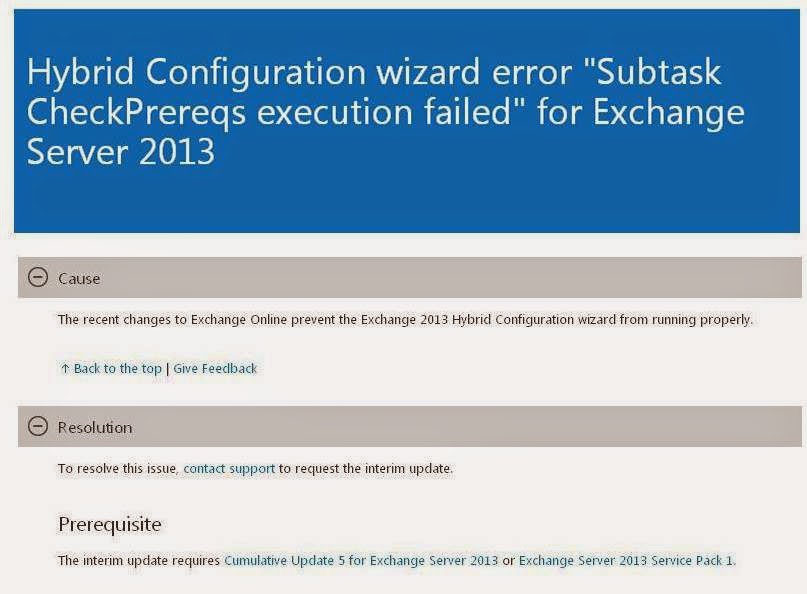
Hybrid Configuration Wizard Failure With Exchange Server 2013 !!!

Microsoft team released a Knowledge base article to address the new Hybrid Configuration Wizard error that occurs when you run the HCW to create or manage an existing Hybrid Environment with Exchange Server 2013. This issue was recently reported and now declared as a known issue from Microsoft end, caused due to recent changes occurred in the Exchange Online service and suggest us to contact Microsoft support to receive an interim update to fix the issue.


Access the Knowledge base here: Hybrid Configuration wizard error "Subtask CheckPrereqs execution failed" for Exchange Server 2013

Note: Exchange 2010 Sp3 based Hybrid deployments are not affected with this issue. Check your Admin Portal Dashboard if you are already using Office 365 Hybrid for more details.

Update:

Here comes the official ELHO Blog post from Microsoft on this issue with FAQs

Important update available for Exchange Server 2013 hybrid deployments 

Update:  

This issue is fixed with the new Exchange Server 2013 CU6 Release and if you have already installed the interim update for fixing the issue you are not required to uninstall it and continue your upgrade to CU6.

Refer here : http://support.microsoft.com/kb/2988229


Monday, July 28, 2014

Official Microsoft Twitter Accounts to follow...

In Today's IT world Social Networking plays a major role and now everyone is connected with each other from anywhere on any device that's the power of Technology. Its always good to know whats happening in the Industry and stay focused on the next upcoming events and equip yourself to face the new challenges and take a deep dive in to the Technology.


When it comes to Microsoft Technology the changes are occurring at a rapid rate and to stay inline with these changes we need a strong medium which continue to update us with the latest happening everyday, every minute and even every second I would call, for which our "Twitter" takes the credit. Believe most of you already have a Twitter account and started to follow your favorite people and shared thousands of tweets across the globe, eventually for most of the people it has became a part of life, I am including myself for example.

Today I wrote this post to share you the recent Microsoft WIKI page, I came across containing the most vital Official Twitter accounts that we can follow to get the latest updates on Microsoft Technologies as stated above, All of these accounts are made available under a single window and the beauty is, its getting updated on regular basis and allows you to keep a track on the latest accounts once available and even you can suggest one if you find to include to the list.

Microsoft team broadly classified these accounts into the below categories and you can choose the ones to follow as needed.

Microsoft Twitter Accounts
  •     Advertising
  •     Careers
  •     Community Initiatives and Corporate Citizenship
  •     Conferences
  •     For Business Users and IT Decision Makers
  •     For Developers
  •     For IT Pros
  •     For Partners
  •     Help and Support
  •     Influential Individuals
  •     Learning, Education and Students
  •     Licensing
  •     Microsoft - News and Major Announcements
  •     MVP Program
  •     Open Source
  •     Products and Product Teams
  •     Research and Labs
  •     Security and Online Safety


Review the WIKI Here: Official Microsoft Twitter Accounts

Start following these accounts to stay up-to date with Microsoft Technologies and share your tweets to enhance the community. Happy Tweeting...

Sunday, July 27, 2014

Lync 2013 Client Sign-in Process

Its been quite sometime since I wrote few posts on Lync as I was so much involved in to Office 365 deployment and Administration over these days, Today I decided to review few of my old Lync Bookmarks to view some vital information on Lync 2013 Client Sign-in process and write a post to share with you.


When we migrated from OCS R2 to Lync Server 2010 there was so much excitement in the early days to administrate the new Lync Server 2010 Environment and end user education was quite challenging those times as users were used to Live meeting and later everyone adopted the new Lync Environment, As Technology never stays stable we had the new Lync Server 2013 released which is even more robust than its predecessors, wherein we have more new enhancements and architectural changes made to the product with this version which took Lync to the next level in the UC market. Organizations who adopted Lync started their migration already to this new Lync Server 2013 and some of them even adopted the Hybrid model having their Lync Environment extend to the Cloud.

Lets get in to our topic, As usual I am not going to write new things on this topic from my end as there are more resources available already in the community well written by Experts and Microsoft product team, so I decided to refer them through this post to provide you with a cumulative content on the topic to give you strong insight over how Lync 2013 Client Sign-in process works, what is required and how you can analyze when there are issues and troubleshoot effectively with the right tools in the right direction to resolve on time for rich end user experience.

Lync Client Sign-in process changed from Lync 2010 to Lync 2013 where in the Lyncdiscover DNS record is checked first by the client to connect to the environment before they follow the old sign-in procedure.

The above said process was first explained in the Nexthop article from Microsoft, later our renowned MVP Jeff Schertz wrote a post on this topic explaining this in detail, This was the first one I read to know this change and have referenced the same below.

Access here: Lync 2013 Client Autodiscover

Once you read this above blog post, for your ease of understanding review the below WindowsITPro post on the topic from Byron O. Spurlock.

Access here: Lync Client Discovery Process

Additionally read the below Blog post from Byron to know the importance of EndpointConfiguration.cache file, which also plays a vital role with the client sign-in process.

Decoding Lync's EndpointConfiguration.cache File

These articles provides you guideline over how the new Sign-in process happens with Lync 2013 Client, next its time for some deep dive stuff. Though there are more deep dive articles available I would always recommend to view things along with your reading because it give you more understanding on the topic.

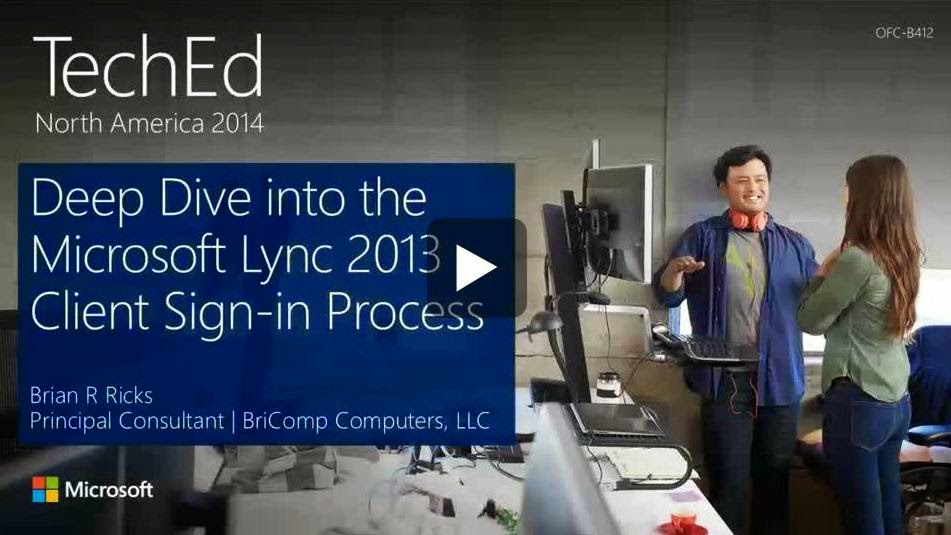
Review the below Teched 2014 Level 400 Deep Dive Session on  Lync 2013 Client Sign-in Process to understand things better from our renowned Lync Expert Brian R. Ricks, Brian presented this same session during Lync Conference 2014 and I am referencing the latest Teched session here.


View here:  Deep Dive into the Microsoft Lync 2013 Client Sign-in Process


With the above resources in place you will have a strong Idea on Lync 2013 Client Sign-in process and add one more credit to your Lync learning.

Monday, July 21, 2014

Microsoft’s Unified Technology Event for Enterprises

Microsoft team is making more changes to the way they deliver products, updates and support in the recent years which is evident from the current happenings in the IT market with Microsoft Technologies. They are so much involved now in providing more innovations to IT world with their current business strategy "Mobile first, Cloud first" which is expressed through various events to partners and customers providing  a strong insight on their vision and future road-map, as a part of this change next year we will be having the new "Unified Technology Event" replacing the traditional SharePoint, Lync, Exchange and Teched Conferences hosted individually over these years and will be now hosted as a Single Event (Unified) from next year, and the Inaugural conference will be held on the week of May 4, 2015 in Chicago, Illinois.


More information is available in the below Official announcement from Julia White MSFT in the Office Blogs.

Access here: Microsoft’s unified technology event for enterprises


Though this is a great change from Microsoft end to host a single event to deliver their vision and road-map, there are different views on this from the community some key views include,  How well we all can plan and attend a single event, Which sessions to attend out of various sessions that will be made available some sessions may overlap as they might get scheduled for the same time, Also is it possible to host events for all products in this short schedule will the time be sufficient, With this change we can expect more number of participants around the world attending the event than ever, how well Microsoft is planning to make arrangements to accommodate the crowd, Will these events be hosted at various regions over the year similar to Teched event and much more. You can watch out the external Technical community pages and MVPs comments on their blogs sharing their views over this change to know more. I am eagerly awaiting to get more information on this topic from Microsoft and look forward to attend this event in live next year and share my experience.

Update:

Microsoft today 16th October 2014 officially announced the new name for the Unified Event as  "Microsoft Ignite" review the below "The Official Microsoft Blog" post to know more. Also follow @MS_Ignite to stay tuned with the latest updates.


Review here: Introducing Microsoft Ignite and our lineup of top conferences in 2015

EHLO Blog post published today on this announcement.

Introducing Microsoft Ignite – meet us in Chicago

Assist Microsoft team to Shape the new Ignite Event through the new Ignite YamJam.

Review here for more details: Help shape the Microsoft Ignite event

Sunday, July 20, 2014

Worldwide Partner Conference 2014 Video Sessions now Available!!!

Microsoft Worldwide Partner Conference 2014 was completed recently, This event is quite significant one in their history as this is the first conference for Satya Nadella as a new CEO of Microsoft, his Keynote Session was awesome and filled with rich information on how Microsoft is designing their product line to address the needs of various customers in today's emerging Technology, it show you how they are building their future road-map with their current business strategy "Mobile First, Cloud First" and how successful they are doing this with the help of their partners world-wide.


This year we have more innovations from Microsoft like Azure Machine Learning, Delve etc. which were showcased during the event along with other new updates on partnering and business. Also this time we had more sessions from partners and Microsoft Leadership team on various topics and all were excellent. Microsoft team has provided some key videos on demand now in the WPC Community forum, when you review each video you will come to know how Microsoft team is getting ready to re-architect the future of IT. If you are partner or a customer who use Microsoft products in your IT Infrastructure and you are planning to either adopt or already using their Mobility and Cloud computing platform then these videos are the best one for you to watch to know the present and future of Microsoft Technology.


Access here : Worldwide Partner Conference 2014 Videos

Tuesday, July 15, 2014

Office 365 Client Connectivity

Microsoft team has designed their Office 365 Environment effectively with a huge investment keeping in mind that they need to provide a highly available solution for all the customers adopted their service, To provide service for world-wide customers they have datacenters placed across the globe that are well connected with one another through highly reliable and scalable networks, which makes this Highly available solution possible. As an administrator its always good to understand how our clients connects to the Office 365 and how it varies for each Online service. To know this better Microsoft team has published a TechNet article, This post is written today referencing the article along with few other important resources to provide adequate information on the topic in a nutshell and share it with you.


Before you begin you need to understand how Microsoft team has designed their Architecture and how it reals works, to know this review my earlier blog post referencing the Share point conference video session "What's behind Office 365?" once you review this video, you will have a strong idea over how things are setup and work in the backend.

Now its time for us to review the TechNet blog post, when you read this article ensure that you capture the differences between how each client connects to different Office 365 service and how it varies from one another, for Example: SharePoint Online Client connects to the Actual datacenter and Lync Online Client connects to the nearest Regional datacenter etc.  Having clear idea in this area will make you understand how the actual connection is established when your clients tries to access the service internally within Office 365 datacenters and provides you adequate knowledge to troubleshoot issues if the client is not able to make successful connection with the service.


Review the TechNet Article here: Reference: Client connectivity

Ensure that your Organization meets the below critical requirements for the clients to connect to the Office 365 service, These critical requirements include System requirements, Network Connectivity Configuration and DNS records, there are other requirements too and these areas are critical and most of the issues occur in this part if its not setup as desired, so as stated earlier ensure that your Environment is setup properly in-accordance with the guideline provided by Microsoft.

Office 365 system requirements

External DNS records for Office 365

Office 365 URLs and IP address ranges

If your Organization is fine with these above key areas then you will likely have a highly available solution with the Office 365 service.

Thursday, July 10, 2014

Codename Oslo is now "Delve"

Microsoft Officially announced yesterday their new project Codename "Oslo" will be now called as "Delve", the most awaited Office graph feature will be released by the end of this year for Office 365 customers as per Microsoft Official announcement.


"Announced earlier this year as Codename Oslo, today we’re sharing that the official name is Delve. Delve, the first experience powered by the intelligence fabric we call the Office Graph, will be available to Office 365 customers later this year. It’s an incredible new way to search and discover content across Office 365 that delivers personalized insights based on machine learning. Delve surfaces information that would be of interest and relevance to you, enabling you to discover and connect with new information you might otherwise not have. Delve effectively removes the information silos that exist across applications, while better supporting information discovery to enable teams to work together as a network."

Microsoft team is getting ready for the next week Worldwide Partners Conference and this time they made lot of innovations to their product line to meet the on-demand requirements of the Cloud market, few other notable things are Azure Machine Learning , New SMB Plans for Office 365 etc. Below Official Microsoft Blog post outlines these announcements and we can expect by the end of this year Microsoft's Innovation in their Cloud business will take the industry to the next level.
  
Review the Blog post here: Microsoft delivers updates, innovations and expansions to meet cloud demand

Checkout this updated Office Blogs post : Introducing Delve (codename Oslo) and the Office Graph

Tuesday, July 08, 2014

Hybrid Cloud Series - Episode Three

Get ready for the next Webinar in Success with Hybrid Cloud Series scheduled this July 17 2014. You can access my earlier blog post here to gain access to the previous Webinars available on demand.


This Episode 3 in series is quite a vital one to attend as Mark and Brad will cover the key aspects on hybrid cloud options available for customers who migrate from Windows Server 2003, which is reaching its end of support by next year July 2015, Also other key discussions are on the way over Infrastructure Modernization to give you clear understanding on Microsoft Hybrid Cloud Strategy to take your IT Infrastructure to the next level.


Register here: Hybrid Cloud Series - Episode Three

Thursday, July 03, 2014

End is near for Windows Server 2003...The Countdown begins!!!

Believe everyone is aware about the deadline for Windows Server 2003 extended support, which is scheduled for 14 July, 2015 post which you will not receive any support or updates for the Operating system similar to our Windows XP and Exchange Server 2003 which reached their deadline earlier this April 2014, I wrote a blog post on this earlier under the name "The End is Near for "Legacies" to provide you an heads up on the same and now its time for us look back and get ready to upgrade to the latest Supported Operating system and we have a strict deadline of about one year from now over which we can get this upgrade completed and move the workloads to the new Server platform and stay safe and enjoy the benefits of the new Technology which went beyond our imagination and far away from Legacies.


I wrote this post today to remind you over this topic and share you some vital resources available from Microsoft that provides you adequate knowledge and makes you ready to get things started at the right time, which is now, I would suggest so that, we can get things completed sooner rather than later within the deadline.

Before we begin watch this Windows Server 2003 End of Support Awareness video from Microsoft to know the impact.

Performing a Server transition is not a easy task as it involves thorough analysis within the current environment to ensure that all the supported applications that relies on this legacy server platform is upgraded to the next supported version. When we do this migration we typically end-up changing Forest and Domain functional level to the next supported mode (Raise functional level) which is the key for most of the stuff to work in the Server Infrastructure, which will for sure have impact on all the supported products and applications that relies on the current Windows Server Operating system functional level and to do this we need to have a proper plan in place and also thorough testing if possible before we make any major changes and execute things with care for a positive transition without unexpected events to occur that could impact our business by causing downtime.


With the above points its pretty clear that we need to move away from Windows Server 2003, so now the next question comes here, To which Windows Server OS I make the switch, Server 2008 R2 or 2012 R2? This is a genuine question as people don't want to migrate straight away to the latest version as their workloads cannot be moved all of a sudden to the new technology wherein most of their legacy applications still relies on the older platform and not yet re-written to adopt to the current one, but this puts some risk for them because even Windows Server 2008 is reaching is end of main stream support soon and will be in extended support till 2020 but there wont be any new enhancements when you make a move here and the suggested one is to move to 2012.


As everyone aware that Windows Server 2012 R2 is the most robust Operating system in the present IT market which revolutionized the industry and placed Microsoft on the Top making it one of the largely adopted Operating system world wide, which is now running and serving millions of users in Microsoft Public Cloud Infrastructure that took their Server business to the next level. Additionally you can extend your Organization and move your workloads to Microsoft Cloud i.e.,  Microsoft Azure which is the next option that puts your Organization one step further in the industry.

I complete my review here and Its now time for you to start your learning and get ready for transition, before you begin read this below TechTarget post that covers critical points on the topic in a nutshell that provides you clear roadmap for your next action.

Plan to migrate before Windows Server 2003 end of life

Begin by reviewing this below TechNet walk-through post on Migrating Active Directory from 2003 R2 to 2012 R2 which clearly shows you step by step process to get this task completed.

Migrate Active Directory from Windows Server 2003 R2 to Windows Server 2012 R2

Once done, Here comes the vital resource as I stated earlier, Its the new Microsoft Virtual Academy Live Event " Migrating Legacy Windows Server to 2012 R2 and Microsoft Azure " scheduled this July 24 2014, 9.00 AM- 1.00 PM PDT, Presented by Andrew McMurray, Microsoft IT Evangelist get yourself registered for this Event and gain real time experience in understanding the need for transition and plan your successful Migration a head from Legacy and share your experience, I will be performing this activity soon and update you with mine. Happy Migrating... :)


Review and Register here: Migrating Legacy Windows Server to 2012 R2 and Microsoft Azure

Update: 

If you missed to attend this course on July you can now watch this re-broadcast of this course with Live Q&A session with the instructors scheduled this August 14, 2014 9:00am–1:00pm PDT

Add-on Read: 

Here comes the official Microsoft simple four step process: Discover, assess, target and migrate from Windows Server 2003.


Check here: Windows Server 2003 end of support

*Additionally download and read this below IDC Whitepaper

Download here: Windows Server 2003: Why You Should Get Current 

Update:  

Get ready to block your calendar this Friday, Sept 26, 2014,  1 pm – 2 pm ET to attend the free Webinar "Windows Server 2003 End of Life" from Netcom Learning presented by Shane Snipes MCT covering some key concepts on Windows Server 2003 End of Life and deep dive discussion on following the above said 4 step process for successful migration.


Register here: Windows Server 2003 End of Life

Update: 

Windows Server 2003 reaches end of support in less than 6 months, get ready to move on.

For customers still using Windows Server 2003, now is the time to migrate - The Official Microsoft Blog.

Wednesday, July 02, 2014

Microsoft Online Services Service Level Agreement!

Service Level Agreement is the bridge between the Customer and the Service provider over which everyday IT business activity runs and our Office 365 is not an exception, Microsoft has clearly defined their SLA in terms of all their supported Online Services, having clear idea on this one becomes mandate for every Admin to know the service levels and manage the environment effectively. I missed to refer this vital information under my Office 365 section and got a chance today to update it to make available for readers under the collection.

Review the below Microsoft Volume Licensing webpage and download the current SLA reference document.

Download here: Microsoft Online Services Service Level Agreement

Also download and review the Microsoft Office 365 Dedicated Service Level Agreements to know the SLA for dedicated plans.

Download here: Microsoft Office 365 Dedicated Service Level Agreements

Update:

Microsoft team recently made a significant change to the Online Services Use Rights document to understand their terms and conditions at ease across their various Online Services offering.

The Online Services Terms (OST) document replaces the Online Services Use Rights document starting July 1, 2014. The OST will be refreshed on a quarterly basis similar to the Product Use Rights document and is posted at the same location.

Review the announcement here: New “Online Services Terms” Document Streamlines and Unifies Licensing Terms across Microsoft’s Online Services

Direct Link: Volume Licensing for Microsoft products and Online Services