Monday, June 30, 2014

ITIL 2011 - The Big Picture

ITIL is not a new term for our IT folks, Most Organizations has accepted this world renowned IT Service Management framework and using it in their day to day activities, having some basic idea on how this framework functions and how it benefits our IT Infrastructure makes our job easier. I recently came across this below ITIL 2011 big picture poster which clearly shows the critical components of ITIL Service Lifecycle providing a clear visual approach to learn and understand the topic in a nutshell.


Download here: ITIL 2011 - The Big Picture

Tuesday, June 24, 2014

Office 365 Outages in a Row!!!

Yesterday and today are quite a bad day for Microsoft and Office 365 customers, Microsoft team recently made new enhancements to the way they deliver updates for  Office 365 customers using the new Office 365 for Business Public Roadmap which was a great innovation and welcomed by everyone in the community. Though great things are in place at one side and everywhere we see Office 365 and Microsoft Cloud on the top on the other end, its quite unfortunate that we had two major unexpected outages in the last two days affecting major customers during production hours causing severe business impact at a large scale, Yesterday it was Lync Online and Today its Exchange Online. Being a Office 365 Administrator for a global client managing one of  the major tenant affected by this issue I literally felt the impact it had on my Environment and Organization's Business.


Though Outages are unavoidable with any service which is inevitable. Though we take this in to consideration and ideally call these as a "Service Interruption"  its quite unacceptable if they occurs during the business hours one after the other in consecutive days causing drastic impact to customers, which eventually put a thought on customers mind that though Microsoft team is doing great enhancements at one side they need service improvement on the support side. New enhancements are always secondary for any customer if their primary goal of providing highly available service to critical services like E-mail and Instant Messaging are at-stake and needs critical attention. All these shows still Microsoft needs improvement in this key area.

There are more customers out there in the Market who are planning to adopt Office 365 service, my recent post " Office 365 Evaluation with Gartner" is one key example and they all are now in a state to reconsider whether they can move or not due to these major outages. Because nothing is hidden in today's IT world and everyone knows that during this critical issues all we can do is to just wait for the dash board to get refresh with the current update from Microsoft, Raise support cases to report our issue to receive updates and also keep updating our internal users and management regarding the status without any great action from our end till the issue gets fixed, by this time all our users would have really frustrated with the downtime and end up blaming us for moving to cloud, We alone know that we were handcuffed at this stage without being able to do anything on this from our end to restore the service which we could ideally do if we are on On premises over which our users were used to for long years before we adopt Office 365, promising them that they will have highly available service as before with many add-on features.

Below is the ZDNet post which outlines these issues with the current status update, Its getting updated once there is a new update from Microsoft end and if you are one of the affected customer like me keep a track of your mail delivery queue towards Exchange Online from On premises if you are in a Hybrid environment and check your user's web mail and outlook performance periodically. Ensure that your dashboard is refreshed often to review the current information form Microsoft team and act accordingly, Update Microsoft team if you face any issues which didn't get fixed once the portal gets updated as resolved for their further action.

Review here: Some Exchange Online users reporting email problems
 
If you surf Online you can find some of our Technical Experts, Community members and Customers affected by these issues already started to share their views in the global community, few vital ones are mentioned below for your reference.


Microsoft's Exchange Online becomes Exchange Offline as service goes dark - Computer World Magazine

Microsoft Restores Exchange Online Service after Tuesday Outage - Redmond Magazine

Hello, Microsoft. Welcome to IT - WindowsITPro


I wrote this post today to share how the world reacted to these unexpected events occurred with Office 365 in a row, which I never expected, As I always recommend my clients and well known folks to move to Office 365 and continue learn more about it, amazed over its new enhancements and tend to share my good experience on the product line all the time through my blog and other means, these are quite bad events which I wanted to keep a track and share my thoughts. Hope Microsoft team acknowledges these pain points from customers and improve their service and ensure that these sort of Outages won't occur and if they do occur unexpectedly then efficiently update the customers and partners to handle the situation in a controlled manner in the mere Future.

*Update:

Microsoft Rajesh Jha, Corporate Vice President, Office 365 Engineering team apologized for the Lync Online and Exchange Online downtime to the affected customers in North America Region. He wrote a post today and expressed his apology, also explained the root cause for the issues and the action taken to restore the service, soon PIR will be released providing the complete RCA with the next steps for service improvement.

Access the Office 365 Community webpage below to know more in detail.

Recent Office 365 service issues 

Additionally review the ZDNet post from Mary Jo Foley and Redmond Magazine post from Kurt Mackie covering some key aspects on this announcement.

Microsoft explains roots of this week's Office 365 downtime

Microsoft Offers Explanations for Lync and Exchange Service Outages 

Review the below WindowsITPro blog post from MVP Tony Redmond sharing his views over the issue and recommendations.

Directory flaw led to Exchange Online outage

Final thoughts...

Though these issue were related to Microsoft they typically throw some light to us that not all services can be stable all the time and as a precautionary measure ensure that we monitor our Environment proactively and keep an eye components like Dirsync and ADFS (if you have SSO), Network/Firewall connectivity changes etc., with a reporting mechanism to avoid other potential issues that could occur from our end which will still have similar impact like this. One key factor here is we do have the in hand control to address the issues in these areas if they occur but Effective monitoring plays the major role to make this happen on time, If you don't have one in place already then start to plan for it in your road-map from today.

* Check out my new blog post "Office 365 Availability and Performance Monitoring" for some additional information on monitoring Office 365 for High availability and better performance.

Thursday, June 19, 2014

Office 365 for Business Public Roadmap Released!!!

Microsoft team recently announced that they are making some significant changes to the way the deliver new updates to Office 365 and the user communication and stated that customers will have a clear visibility on what is coming next and what is going to be available in the mere future.


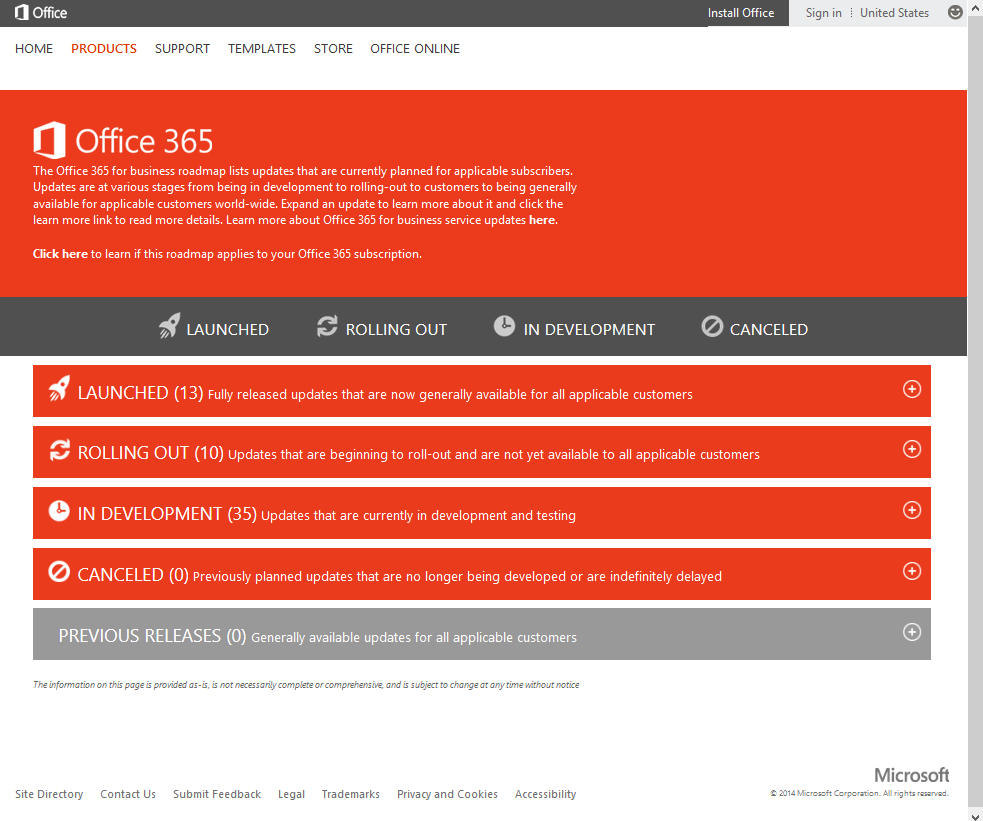
Microsoft team has a very strong Roadmap for Office 365 and many great features were recently rolled out and some were announced and under evaluation and going to get released soon for customers and to have a clear vision on their Roadmap they launched the Public Roadmap site which clearly shows what is Launched, what is currently Rolling out , what is yet to come (In Development), what is Cancelled along with previous releases if applicable under a single roof providing an attractive and feasible way of understanding the present and future with Office 365.

The most important thing which attracted me is the First Release opt-in  program which is released along with the Public Roadmap and now its available under Office 365 portal and if you don't see it then it will be available soon as Microsoft team started to rollout this for all the tenants. This will be quite useful if your Organization is interested in opting into the release group to test the new features as the name states once released, an Office 365 admin can log into the admin portal and select First Release under service settings to enable this feature. Go to Admin > Service settings > Updates.
 

Review the Official Announcement here:  Improving visibility to service updates

Access the Roadmap here: Office 365 for Business Public Roadmap

*Access the Office 365 Technical Network in Yammer and join yourself to the Roadmap Communications YamJam Group and Log in at 9:00am PT on Tuesday, June 24th to get your questions answered from Microsoft.

Wednesday, June 18, 2014

Hybrid Cloud Series - Episode Two Webinar

Its time for another Excellent Webinar on the Hybrid Cloud Series, I wrote a post earlier this April referring you to the First Hybrid Cloud Webinar on the series hosted by Microsoft Azure Team and speakers were none other than the two key people who Architect and lead the Microsoft Cloud business " Microsoft Technical Fellow Mark Russinovich and Microsoft Corporate Vice President Brad Anderson".


Register to attend this complimentary webinar on Monday, June 23rd, 2014 from 10:30 A.M. - 11:45 A.M. PDT to learn about:

  •     A hybrid approach to management
  •     New options for connecting to the cloud
  •     Hybrid options for disaster recovery
  •     Keeping security front and center
 

Register here: Hybrid Cloud Series - Episode Two
 

Tuesday, June 17, 2014

Active Directory Migration Tool (ADMT) Guide Updated!!!

Active Directory Migration Tool (ADMT) is not a new tool for Administrators who are performing Cross Forest migrations during M&A Activities and a well renowned tool for performing domain migrations within and outside the forest.  I wrote this post today to refer you to the latest updated ADMT Guide published by Microsoft team available for download to know more on the usage and functioning of the Tool.


This guide assists Active Directory administrators in performing domain migration through the use of the Active Directory Migration Tool version 3.2 (ADMT v3.2). ADMT v3.2 has recently been updated and re-released. The version remains v3.2 because it’s functionally the same as its predecessor (that is, there are no new features). This final release includes various bug fixes and can be used with all supported Windows operating systems and versions of Windows Server Active Directory.

*The key point to note here is, earlier the Tool was not supported on Windows Server 2012 and now its updated to work with the Latest Windows Server Operating system thus reducing the need of a Legacy Server Operating system during migrations.


Download here: Active Directory Migration Tool (ADMT) Guide: Migrating and Restructuring Active Directory Domains

Web Application Proxy (WAP) and Application Request Routing (ARR) - Ignite Webcast

When comes to publishing our Exchange Server to outside world the first thing come to our mind in past days in ISA and then we had its next version TMG, As everyone aware that TMG is discontinued and its Main stream support is ended and its in extended support period and Organization's who has already adopted TMG is still using it and for new deployments we can no longer rely on TMG.


With the advancement of the Technology Microsoft Team made some new enhancements to their Windows Server product line through which we can now publish Exchange without the need of TMG using either Web Application Proxy (WAP) or Application Request Routing (ARR) both has its own pros and cons and different deployment approach and functioning, based on the Organization's requirement we can adopt any one of these to publish Exchange, Having good knowledge on these new TMG Alternatives is now a mandate for every Exchange Admin for publishing Exchange securely with their future deployments.

To know more attend the upcoming Ignite Webcast scheduled this month June 26 9.00 AM PST presented by Senior PFE Georg Hinterhofer MSFT.


Register here:  Web Application Proxy (WAP) and Application Request Routing (ARR)

Friday, June 13, 2014

Directory Synchronization Test Lab Guide

Setting up Directory Synchronization is vital part with Office 365, Microsoft team continue to do major changes with the Identity and Authentication platform where the traditional Dirsync Tool ( Down sized version of FIM) used to sync Objects from your On premises AD to Office 365 has gone through a drastic change in the recent days, if you look at the Road-map over this tool from Microsoft,  you can notice it was enhanced with great features like "password hash" a new feature that provides ability for users to use same password to access Office 365 resources with out the need of ADFS, where now major Organizations are switching from ADFS SSO to Password Hash post this feature, then its further enhanced to support password write back feature where passwords are written back to On premises once they are reset in cloud with Azure AD premium, further more now it acts as a backup for ADFS SSO in a Disaster Recovery scenario.


Microsoft team published a test lab guide with clear instructions for setting up Dirsync Server in lab and test its ability to have hands on experience on the tool, this post is a reference to the tool for readers to utilize this guide and setup Dirsync server on their lab to see how it really setup and works along with few other vital information over this tool in a nutshell.


Download here: Test Lab Guide: Set Up a Directory Synchronization Server to Sync Users with Office 365 


Final Thoughts...

Microsoft team is planning to retire this Tool in the mere future and introduce their new Azure Active Directory Sync Services Tool  which performs the same role as Dirsync server with some advance capabilities that support complex Multi-forest topologies along with other set of enhanced features and serves as a single robust tool, which still under evaluation and development to add few new capabilities before it reaches final availability and soon you can receive an global announcement on the replacement of the Dirsync Tool in the upcoming days.


Wednesday, June 11, 2014

Office 365 Fundamentals New MVA Course

Microsoft Virtual Academy team has recently launched the new Office 365 Fundamentals course for ITPros to understand Office 365 in a better way covering various vital aspects on the topic, register your self and complete this course to know more with Office 365 from your current level of understanding on the product. If you are new to Office 365 and use it as a starting point towards your advanced learning.


Access the course here: Office 365 Fundamentals

Tuesday, June 10, 2014

Exchange Online Protection How To Videos now Available!

Exchange Online Protection (EOP) is the current version available with Office 365 replacing FOPE and also available as a stand-alone product to provide support for On premises customers, most of the customers who are familiar with FOPE find some difference in managing EOP which now comes within the EAC for GUI management and Remote powershell management by connecting to the EOP Service. We no longer need to manage things separately as before with FOPE. Being said all these, there are still some dilemma exist among the Admins to know how to manage EOP for various day to day tasks, to overcome this Microsoft EOP team has published a video series covering most of the common tasks with EOP.
 

This Series includes below walkthrough videos,

Set up mail flow

Configure IP allow and IP block lists

Configure spam content filtering

Find and release messages from the quarantine

Configure the outbound spam policy

Configure the anti-malware policy

Configure transport rules

Start using Remote PowerShell


Review the complete Video Series here :  Videos for getting started with EOP

Sunday, June 01, 2014

Troubleshooting Outlook Connectivity and Performance issues with Office 365

I am writing this topic today as this post is a vital one to cover which was long pending from my end and got a chance today to cover this, There are many knowledge base articles and blog posts available from Microsoft and Technical experts already on the topic and I decided to reference them all here instead of rewriting the whole story and share my personal experience along with it so that it makes a complete post on the topic with maximum information made available under a single window, which makes you more strong while troubleshooting Outlook Connectivity and Performance issues with Office 365 and provides you adequate tools and resources which will help you to resolve the issues on time and take corrective measures and approach Microsoft team with the right data if things goes beyond our hands for effective resolution.


Lets begin here, Outlook client issues are the most painful issues that any admin could face in an Exchange On premises or Office 365 Environment and the more delay in resolving these issues will result in poor end user experience and this puts the Admin under pressure from the business end because E-mail has become the most prominent mode of business communication and any minor downtime in this area causes a major impact to the Organization's Business and needs critical attention. We cannot expect the environment to be up and running all the time as issues are sporadic and having strong understanding on the architecture and product knowledge with effective troubleshooting skills paves way for proper resolution over issues with minimal downtime and providing a seamless Admin and End User Experience.
  
Outlook client remains the same when it comes to either On premise or Cloud (Office 365 )and their behavior varies with each service model and we need to understand how the client behaves amongst these two models and also how it behaves when we have both in a co-existence model (Hybrid) is the key for providing support when things break unexpectedly over time.


When it comes to Office 365 Microsoft team recommends Outlook client used with the service is the latest one available in the market, currently we have Outlook 2013 with SP1 available with rich set of features to work great with Office 365 also Microsoft team still supports legacy Outlook 2010 and 2007 clients but for maximum performance and enhanced experience the suggested client is the latest one.

Review the Office 365 System requirements Overview article referenced below to know the supported clients that work with Office 365.

Check here: Office 365 System Requirements 

*Also ensure that the following IP addresses and URLs for Office 365 are allowed in your Firewall which is a basic requirement for everything to work with Office 365.

Check here: Office 365 URLs and IP address ranges

Ensure that you subscribe to the RSS Feeds so that you can stay up to-date with the IP address changes and allow them on your firewall and proxy proactively to avoid issues, its always recommended to use URL based filtering and not rely on IP based filtering when you use Outbound proxy as suggested by Microsoft, this will covered in the later part of this article.

Next, Ensure that you have the latest service packs are updates available for the client which is released every month from Microsoft team to ensure that your client stays update to date with the service, If you are using Legacy Outlook clients like Outlook 2010 or 2007 ensure that you have the latest or the supported service packs and public updates installed which are a mandate requirement to have the client connectivity possible with Office 365, Microsoft team has successfully rolled out the Wave 15 upgrade to all tenants and as stated in the below referenced service upgrade guide under Outlook client section ensure that your legacy clients are updated with the required service pack and public updates to avoid issues when connecting to the service.

Review the Service upgrade guide here : Guide to the Office 365 Service Upgrade for 2013


Note: Outlook 2007 main stream support is ended in 2012 and if you are still using this client ensure that you plan for a upgrade soon as stated in the below detailed TechNet post on Office 365 System requirements under the "Office clients in extended support" section soon you will start to see some issues with the service if you use Outlook 2007 in your environment and you will not have any fix for the same and support from Microsoft team. Also ensure that you met other requirements stated in the article for better support experience.

Review here: Office 365 System Requirements - TechNet

Lets get in to the Tools we have handy to troubleshoot outlook issues, The first tool is the well renowned Microsoft Remote Connectivity Analyzer Tool which is the best one that will tell you the actual cause of the issue when you run against it in your environment and gives you the underlying cause and assists you to identify and resolve most of the issues, next we have the new Troubleshooting Walkthrough Tool available handy for troubleshooting various outlook connectivity issues providing suggested workaround and fixes proactively to fix things before you reach support and below is the reference for the same and the best place to begin your troubleshooting post the EXRCA test.

Check here: Office365 Outlook Connectivity Guided Walkthrough

Next you have the OFFCAT tool from Microsoft team which will analyze your Outlook Client on the machine and provide you the detailed report of issues found along with the suggested fixes and this is best tool to analyze your client post you validated that other things work fine to narrow down the issue.

Review here: Office Configuration Analyzer Tool (OffCAT) information

Next you need to review the below recently updated Microsoft Knowledge base article in first place when any user updates about the Outlook client  Performance issues with Office 365 as it covers various key points to check over the cause of the issue and provides the fix, which is quite a good one to follow before you step in to the next upcoming advance deep dive analysis over the issue.

Review here: Outlook performance is slow in the Office 365 environment

The most common performance issue with Outlook clients is either they are not having the latest patches or service packs and gets fixed once you address this, and the next common one is the OST file over size issues and when it comes to Outlook 2010 and 2013 the default behavior of outlook client is to cache other user email and causing the OST file size to increase if the affected user has more additional mailboxes mapped to their client causing performance issues and also these users will complain they have performance issues when they access their secondary mailbox contents which is related to the same issue and  the below Knowledge base articles outline the cause and suggested fixes which address most of the performance issues and if things are beyond this limit it requires some deep dive troubleshooting.

By default, shared mail folders are downloaded in Cached mode in Outlook 2010 and Outlook 2013

Performance problems when you try to access folders in a secondary mailbox in Outlook

How to troubleshoot performance issues in Outlook 2010

*There are more knowledge base articles available from Microsoft team addressing various Outlook issues related to our topic and few over other issues and the above articles are the vital ones to check and address as these are the common issues that affect Outlook client performance in most of the Environments.

Once you are done with the above learning lets get in to some deep dive stuff as stated, first begin by understanding Outlook Client Autodiscover process and the issues you could face with Office 365 in both fully cloud and Hybrid deployment if things are not configured properly and other hidden issues that could cause Outlook connectivity and performance issues and I have recently written a blog post on the same with various resources and resolution identified with self experience covering the critical aspects on the topic.

Review here: Disable Autodiscover SCP Lookup for Outlook Clients with Office 365

Next you need to understand the impact of Network design between the Client environment and Office 365 along with few other vital aspects on the Outlook Client end that could cause issues while connecting to the service occurring on a larger scale affecting the whole environment and causes major impact, and  if we don't get our hands on this deep dive topics while working on these major issues post regular troubleshooting we will be in great trouble.

I am going to refer you to the below vital blog posts which are quite significant and most important for every Exchange/Office 365 Admin to know and read to utilize the source of information shared to ensure that their environment is analyzed for the same and take necessary action over the Architecture design requirements as guideline by the posts to have proper connectivity and best performance with Office 365 service.

First review the below TechNet blog post from Neil Johnson, where he discusses on the MAPI RPC Latency issue and Client system performance issues that could cause potential impact and showing you the steps how to analyze your environment on the same along with the corrective measures.

Review here: Outlook Performance Troubleshooting including Office 365

Next, check this excellent TechNet blog post on Network configuration issues that could cause potential impact to the connectivity when things are not setup the way as shown in the post, which is a vital one to check and address as this the major cause for most of the environments to have issues with Office 365 and addressing this will provide better experience.

Review here: Network Perimeters & TCP Idle session settings for Outlook on Office 365

Also read this below vital post from the same TechNet Blog "On the Wire" to better understand how Network, firewall and other components configuration play a vital role in Office 365 Connectivity.

Top 10 Tips for Optimising & Troubleshooting your Office 365 Network Connectivity 

One more essential ASK PFE blog post for troubleshooting Office 365 slowness.

How to Troubleshoot Office 365 Service Slowness?

One more vital part over to lookout is the Proxy issues that could potentially cause things to break if the required URLs and IPs are not by passed from filtering and as stated in the initial part of the article, Microsoft team recommends Organizations using Outbound proxy device for filtering to go with URL based filtering and not the IP based ones as the IPs are tend to change over time, to understand this are better review the below EHLO blog post.

Office 365 URL based filtering is just better and easier to sustain

Additionally review the below TechNet Blog post to understand the impact of Proxy configuration while connecting to Office 365 and the suggested workaround to address this issue shared by Michael through his real time experience.

Outlook takes several minutes to connect to Exchange Online (O365)

Also utilize the below referenced Microsoft Knowledge base article that provides the hot fix which will address the connectivity issue with Office 365 if you have your proxy configuration setup as stated in the article.

Outlook may take two to three minutes to connect to an Office 365 mailbox

From my experience I have seen issues caused with Office 365 mostly due to the proxy configuration in the environment and you need to pay critical attention to this topic and ensure that you setup your proxy settings inline with Microsoft guidelines.

Ensure that all the above articles are reviewed thoroughly along with the steps guideline to analyze the environment and troubleshoot issues, I would suggest you mark these articles as vital in your bookmarks and utilize them properly whenever applicable.

Another one I am referencing here is an excellent LinkedIn discussion I recently came across that address the connectivity issue which is caused by a hidden cause which we normally wont check and falls apart from the above shared common issues which is now brought in to visibility. It typically addressed one of the recent issues I came across and thought of sharing this as it might be helpful  if you have a similar issue caused due to Outlook client RPC\TCP fallback and the below discussion explains this along with the suggested fix.

Review here: Office 365 Outlook Connection after upgrade to O365

At last, If things are going beyond your hands you will need end up contacting Microsoft support for further troubleshooting and before your approach them collect the required logs from the Client which will be easy for them to analyze once you contact them for faster resolution, though you will end up doing more troubleshooting analysis like collecting Netmon and fiddler traces etc. the easy one is to turn on Client side logging and provide collect the logs and provide to Microsoft team for initial investigation.

With Outlook 2007 you don't have any special logging available and troubleshooting issues with this client version is quite tough and since the product is out of support you cannot expect a quick resolution on the same and end up in client upgrade, Luckily with supported Outlook 2010 and 2013 you have advanced logging features available that will help you to analyze most of the issues and fix them at the earliest.

Review here:  How to enable global and advanced logging for Outlook 2010 and Outlook 2013

New updates: As everyone aware that with Exchange Server 2013 SP1 and Outlook 2013 SP1 we have the new MAPI/HTTP feature available which is an excellent innovation from Microsoft which is beyond all these issues caused by RPC\HTTP which is the current client connectivity protocol and provides enhanced user experience and minimizing issues for the users, This feature is now starting to roll out to Office 365 customers and if your environment is having the right client version then you can approach Microsoft team on the same and start utilizing this for enhanced experience.

Review this EHLO blog post for more information: Outlook Connectivity with MAPI over HTTP

Final Thoughts...

These are the vital articles, posts and Tools that address Outlook connectivity and performance issues from basic to advanced  and the ones that assisted me to fix major issues during my tenure and will be a great read if you review them all which will make you understand how things work and where it might broke and how to check and address it on time for a better support experience. Will continue to update this post once I came across any new content and also share some new stuffs of the topic once I came across any different support experience on the topic in the mere future.

Friday, May 30, 2014

Microsoft Join Hands with Salesforce!!!

The hot topic for the day is regarding the new strategic partnership between world's largest CRM provider Salesforce.com and the Software giant Microsoft where Salesforce team will develop CRM apps that will be made available for Microsoft customers through various channels as updated below and soon we can see some new announcements from Microsoft on this in the upcoming days.


Microsoft team is continuously making new enhancements to their product line and service through various modes in the recent days targeting towards their "Mobile First, Cloud First" strategy and innovating more in line with today's IT needs and taking their business to the next level beyond imagination in the IT Industry meeting expectation at both ends.

Here are the details from Microsoft News Center on the Partnership.


 “We are excited to partner with salesforce.com and help customers thrive in a mobile and cloud-first world,” said Satya Nadella, CEO of Microsoft. “Working together we’ll deliver new solutions that connect the customer insights of Salesforce to the cloud productivity of Office 365, the cloud platform of Azure and the mobility of Windows, so our customers can do more.”

“Today is about putting the customer first,” said Marc Benioff, chairman and CEO, salesforce.com. “Together with Microsoft, we are building bridges that allow customers to be more productive.”


The companies plan to deliver the following solutions:
  •     Salesforce1 for Windows and Windows Phone 8.1. Will enable customers to access Salesforce and run their business from their Windows devices. A preview is planned to be available in fall 2014 with general availability in 2015.
  •     Salesforce for Office 365. New interoperability between Salesforce and Office 365 will give customers access to the content they need to collaborate, sell, service and market from virtually anywhere. Plans include the ability to:
  •     Access, share, edit and collaborate on Office content from within Salesforce and on Salesforce1 using Office Mobile, Office for iPad and Office 365.
  •     Use OneDrive for Business and SharePoint Online as integrated storage options for Salesforce.
  •     Use Salesforce and Outlook together with a new Salesforce App for Outlook.
  •     Connect Salesforce data to Excel and Power BI for Office 365 to visualize information and find new insights.
Check the Announcement here: Microsoft and salesforce.com announce global, strategic partnership

Additionally, refer the below ZDNet and Redmond Magazine posts for more information

Salesforce next to be certified on Microsoft Azure?

Salesforce CRM apps coming to Windows and Windows Phone

Microsoft and Salesforce Strike Partnership To Bring CRM to Windows

Tuesday, May 27, 2014

Exchange 2013 CU5 Released !!!

Exchange Server 2013 CU5 released today, this is a quite significant update after the latest Exchange Server 2013 SP1 ( CU4) and it contains few enhancements and bug fixes. Latest EHLO blog post updating this release provides more information on the CU. Along with this UR6 for Exchange 2010 SP3 is released.


OAB improvements were made with this release which is a quite significant one and our Ross Smith IV recently written an excellent article explaining the same in the EHLO Blog post.  MVP Tony Redmond has stated this CU update is a remarkable one believing this could be the stable release and written a post on his views over CU5 in his Exchange Unwashed Blog under WindowsITPro forum. Along with this our  MVP Michael Van Horenbeeck updated that CU5 release brought some new enhancements to the Hybrid Configuration Wizard making the OAuth configuration possible now with the HCW and also enabling MRSProxy automatically on servers while executing the wizard itself etc. more information is available in his blog post referenced below.

Access the EHLO Blog post here: Released: Exchange Server 2013 Cumulative Update

Review the CU details here : Cumulative Update 5 for Exchange Server 2013

Download the CU here: Cumulative Update 5 for Exchange Server 2013 (KB2936880)

Exchange 2013 CU5 - the totally unremarkable update (in a good way) - Tony Redmond

New Hybrid Configuration Wizard features in Exchange 2013 CU5 - Michael Van Horenbeeck


Exchange 2013 Cumulative Update 5 - Jaapwesselius

Watch out this space for more updates soon...

Office 365 Evaluation with Gartner

Gartner has done a recent analysis over Office 365 Adoption and also hosted a Webinar, "The Hidden Gotchas of Office 365" presented by Guy Creese,research vice president at Gartner discussing the pros and cons of Office 365 Service providing some insight on how customers react when they plan to move to Office 365 and what makes them re-think whether to adopt the service or continue with their current setup and invest more in enhancing it for their needs or to adopt any other hosting provider.


When it comes to Office 365 Microsoft team is providing more enhancements rapidly as ever before if you take a look at the last few months, you would notice how many significant changes and enhancements were made to the offering which is quite a good one, on the other note, is it really useful for all the customers? whether they really need it, how will it benefit them if they don't need it and also frequent changes in the Office 365 Service make them do some investments in their On premises Environment too in terms of Client upgrades etc which is still a painful part to consider as major changes cannot be done altogether for the entire Organization which involves cost and deployment planning with user education to get in line with their latest product line used in cloud as it makes the Organizations to re-think whether to move to cloud or to stay On premises and enhance it as needed.

Office 365 on the other hand does not provide all possible solutions made available like On premises there are some limitations by design and Microsoft team is working towards getting most of the workloads possible with their service, in this state on the other hand Customer environment should meet certain requirements when they need to utilize any new feature. Licensing model is not quite impressive, when it comes to customers who need to use only certain features though everything comes as bundled together they use only what they need and though its good that these additional services will be made useful when they adopt these services in mere future it is still a question and make them feel that they are paying for something which they don't need and don't use, Though Microsoft team made the Licensing flexible wherein customers can Switch plans as needed but as a customer they require a option where they themselves can select what they need and pay accordingly.

Office 365 is an Extra-Ordinary service where you will get more enhanced features often that provides various benefits to your Organization and designed in a way to make it as a single solution that fits for all customers and continuously evolve along with the Technology, but as a customer its still a valid question to think whether they need to use these new enhancements now and how it will benefit their needs as each Organization's requirements varies from one another from small business to Large Enterprise customers. Also when we adopt any Cloud based service we should think about not only the cost benefits we receive and there are more important things beyond that, where the Customer experience and Support experience comes in to picture which is still question where Microsoft team needs to pay attention and make the adoption more flexible and enhance their service on these key areas which makes the real success for Office 365.

Being a Office 365 Administrator for a Large Enterprise customers I was happy to receive updates over the new features brought in to the service but not all Organization is willing to test and adopt these as an when they release any significant update one after another and its still a question whether customers can keep up the speed with Office 365 service over time, All is well as long as Microsoft does not urge us to do any major changes again in another few months timeline because a huge Wave of "Wave 15" just got over and things are getting stabilized now and it will take some more time for Organization's to get ready for an other Wave and face the challenges.

More detailed discussion was made available in the On demand webinar from Gartner referenced in the below Redmond Magazine post and once you review you will understand more on Office 365 Adoption and if you are one who is taking the decision for your Organization this a must watch for you to understand the service and then plan your moves to Office 365.

Access here: Gartner Lays Out Evaluation Criteria for Office 365 Moves

Additionally, Read the below Network World Magazine post to know and understand the considerations before moving to Office 365 explained in a nutshell. 

Doing an Office 365 Migration the Right Way

On a Positive note I am updating the post with the some new announcements from Microsoft that can address some potential concerns that exist amongst the customers to choose Office 365 and Make them adopt the service as an add-on read.

* Microsoft team is tweaking its Office 365 feature rollout and disclosure process to enhance the customer adoption and the below ZDNet post updates the same in detail, Lets give sometime and see how Microsoft team is going to address the needs and concerns of various customers through the above analysis benefiting the customers who have adopted their service offering and who are yet to adopt it over time. 

Microsoft to tweak its Office 365 feature rollout and disclosure processes

*The Office 365 Trust Center Launched to address the Security and Compliance needs of customers moving to Office 365


*Some new Announcement Microsoft team made recently to enhance the adoption of Office 365 in WPC 2014 

Why FastTrack and the Adoption Offer for Office 365 is great news for partners

Saturday, May 24, 2014

Extending your Active Directory to the Cloud

Its time for reviewing one more vital Teched NA 2014 Session on Hybrid Cloud Deployment, Microsoft team is continuously innovating more on their Cloud platform "Microsoft Azure" and in the recent Teched event the released many significant great features and enhancements for Azure and extending its capabilities to the next level providing a successful Cloud solution suitable for all customers.

 Check here to know more on the recent enhancements for Azure: VM Security Extensions, ExpressRoute GA, Reserved IPs, Internal Load Balancing, Multi Site-to-Site VPNs, Storage Import/Export GA, New SMB File Service, API Management, Hybrid Connection Service, Redis Cache, Remote Apps and more…

When you plan to move to Cloud the best suggested method to adopt is the Hybrid deployment model, Here you will get the benefits of managing both the On premises and Cloud environment seamlessly moving your workloads to and fro as needed. Microsoft team is working hard in making the Hybrid Cloud deployments more smooth and enhancing its capabilities so that customers can setup and adopt their cloud solution at ease. Lets get in to our topic for the day, Today I am going to reference you to the Teched Video session on Hybrid Identity:Extending Active Directory to the Cloud, when it comes to Hybrid deployment the most vital part is to manage the Identities wherein both the On premises and Cloud objects should be treated as objects belong to the same Organization which makes the real hybrid possible and in order to do that we need to extend our Active Directory to the Cloud and to make this possible we rely on the Identity platforms available from Microsoft team like DirSync, new AAD Sync etc. and for providing successful authentication we rely on the ADFS and this video session explains the same with real time scenarios providing an deep insight on how we can extend our AD to Azure and gain a seamless experience of providing rich service to end users across all devices accessed from anywhere.


Access here:  Hybrid Identity: Extending Active Directory to the Cloud
 

Wednesday, May 21, 2014

Microsoft on Enterprise Social

Technology is expanding rapidly minute by minute and its hard for us to keep up the phase with all these changes and its always good if we know what is happening around us and try to inculcate all those information over time and start our learning and evolve to explore more from there brings the next innovation.


In today's world collaboration plays a major role in any business and everyone who work with different technologies or domains or even in the same platform at different locations needs to interact with each other to share some information or co-ordinate to work on a particular project, Employee of an Organization wants to connect with some other department colleague on a official requirement or lets even extend this communication across various other external business partners outside the Organization for all this to happen we need various mode of communication and imagine if we can have this all under a single window which makes our life easier and has capabilities that accomplish all this with renowned procedure without any major changes or learning requirements, yes we do have one like this made available now in the form of Enterprise Social Network, we can even call this as the next generation Business communication Model which may soon come in one size that fits for all and Microsoft team is now concentrating more on this part and innovating more on extending the capabilities of their Enterprise Social platform which takes their Technology to the Next level extending across boundaries.

As of now I believe everyone is aware about "Yammer" Microsoft's Enterprise Social Network product which is available in the market for a while now making the above said effective collaboration possible by integrating itself with Microsoft Office 365 platform and also even serve as a stand alone Enterprise product and forming the next generation Enterprise Social Network model with many other innovations added to it which are on the way along with this.

Microsoft team updated about their new Office 365 Innovations during the SharePoint Conference 2014 where they spoke about Enterprise social enhancements they made through Yammer integration with Office 365 and the future plans via the Office Blogs providing some insight on their new Innovations like Office Graph, Oslo, Groups and other great features added and gave us a strong insight that we are about to see some great changes over the way we communicate henceforth and there comes a new beginning.


Check this blog post to know more: Work like a network! Enterprise social and the future of work

Post this they made some significant announcements on the benefits of using these features and how it adds value for Exchange in the MEC 2014 and published a blog post explaining things in a nutshell along with some additional features that were made available for Office 365 customers proving that Microsoft's innovation does not occur in one place and it benefits all.

Check this post: The evolution of email

Microsoft team took a great opportunity in this Teched NA 2014 and delivered few great sessions on their new innovations and their Road-map towards Enterprise Social which I wanted to share here for you to know where we head to with Microsoft.


Access here: Microsoft's Roadmap for Enterprise Social


Access here: Introducing Codename "Oslo" and the Office Graph

Also take a quick preview on this new Youtube video showing the "Oslo" and "Office Graph" in action

View here: Introducing Codename Oslo and Office Graph

Once you complete reading the blog posts and viewing the videos you will understand how Microsoft team is making new innovations to the way we collaborate and taking the Enterprise Social Network beyond imagination. We can say this is just a beginning and expect more to come in the next upcoming days...