Tuesday, October 11, 2016

OneDrive for Business key features and Roadmap

Learn about the latest key Microsoft OneDrive for Business innovations and a detailed update of Microsoft's strategy and roadmap through this below Microsoft Ignite Session,  Watching this On-demand session is essential if you are using OneDrive for business in your Organization to enhance Collaboration and productivity.


If you are an Office 365 customer and planning to migrate your existing data to OneDrive, you can utilize the Data Migration benefit with the help of Microsoft Fasttrack Center provided you have an eligible plan with 150 or more seats as outlined.

Add-on Read:

Access the following Microsoft Ignite On demand sessions to know the future road-map of SharePoint and Office 365 Groups

BRK1025 - Learn how SharePoint is reinventing content collaboration: vision and roadmap updates 

BRK2033 - Discover Office 365 Groups - overview, what's new and roadmap (Microsoft Ignite 2016)

Here is the new Office Blogs post for Office 365 Groups update at Ignite : Office 365 Groups update at Ignite 2016

Update:

Access the below post to know the New Enhancements to OneDrive Sync

Announcement: OneDrive Sync Updates

Here comes the Announcement for the New OneDrive Admin Center preview

Announcement: New OneDrive Admin Center Preview

Update:

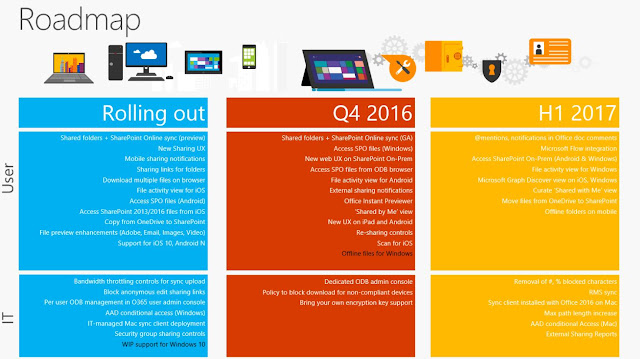
Below is the OneDrive Roadmap for 2017 available as of today.


Update:

Microsoft announced the  availability of several new capabilities in OneDrive for Business that make it easier than ever to sync, share and collaborate on all your files in Office 365.

Announcement includes,

Sync all your files anywhere, anytime across PC and Mac

  • Syncing SharePoint sites and OneDrive for Business shared folders
  • Standalone Mac client
  • Activity center

Simplified file sharing in and outside your organization

  • A new onboarding experience
  • Simplified sharing options
  • Streamlined guest access

Empowering administrators to manage with confidence - New OneDrive Admin Center Roll-out.

Review the FAQs and also share your thoughts and ideas through UserVoice and the Microsoft Technical Community. Also, be sure to attend “Ask Microsoft Anything” (AMA) session on OneDrive for Business in the OneDrive AMA group on Wednesday, February 1, 2017 from 9 a.m. to 10 a.m. PST / 5 p.m. to 6 p.m. GMT.

Access Official Post here: OneDrive brings new file collaboration and management features to the enterprise

Latest updates for OneDrive for Business as of May 2017

  • See all your files in File Explorer with OneDrive Files On-Demand
  • Share files directly from File Explorer on Windows and Finder on Mac
Introducing OneDrive Files On-Demand and other features making it easy to access files

New SharePoint and OneDrive capabilities accelerate your digital transformation

Stay tuned for more updates...

Sunday, October 02, 2016

Cloud Platform Release Announcements for September 2016 aligned to Microsoft Ignite!

Microsoft team made lot of exciting announcements during the Microsoft Ignite 2016 conference last week, this whereto post is written to point you to the latest Cloud Platform Release Announcement blog post, that includes all of the Cloud Platform announcements aligned with Ignite event in a nutshell.


Below are the latest announcements aligned to Microsoft Ignite,

  • Enterprise Mobility + Security E5 | GA
  • Microsoft Azure Information Protection | GA pre-announcement
  • Windows Server 2016 | Launch announcement
  • System Center 2016 | LTSB
  • Operations Management Suite | OMS announcements at Ignite – Available to purchase
  • Azure Stack | TP2
  • Azure App Gateway WAF (Web Application Firewall) | Public Preview
  • Azure Disk Encryption | Disk Encryption for Linux VMs GA
  • Azure DNS | GA
  • Azure Key Vault | Key Vault Certificates GA
  • H Series | GA
  • IPv6 for Azure VMs (Iaas) | GA
  • Storage Service Encryption | GA
  • Accelerated NIC | Public
  • Azure Security Center | New features Public Preview
  • Diagnostics for Network Security Groups and Routes | GA
  • Multiple IPs Per NIC | Public
  • Multiple VIPs for internal Load Balancer | GA
  • UltraPerformance Gateway | GA
  • VNET Peering | GA
  • IT Pro Cloud Essentials and IT Pro Career Center | International launch
  • Azure Service Fabric | GA – Service Fabric for Windows Server
  • Azure Service Fabric | Linux Public Preview
  • SAP HANA on Azure | GA
  • Azure App Service – Logic Apps | Visual Studio Integration GA
  • Azure CDN | CDN from Akamai Standard: HTTP2 Availability GA

Access the blog post here: Cloud Platform Release Announcements for September 26, 2016

Additionally, take a look all the related On demand Microsoft Ignite Sessions to know more.

Introducing Windows Server 2016 e-Book now available!

Microsoft team announced the Launch of Windows Server 2016 at Microsoft Ignite event last week, Following the announcement now you have the latest e-Book published on Windows Server 2016,  written by either field experts or members of the product group, giving you the latest information on every improvement or new feature that is included in this version of Windows Server.


Download the e-Book here: Introducing Windows Server 2016

Access the Windows Server 2016 Announcement post here: Announcing the launch of Windows Server 2016

Update:

Windows Server 2016 goes GA : Another big step in Hybrid Cloud – Windows Server 2016 general availability

Get started with the evaluation today and share your feedback to the product team.

Update:

Official TechNet Documentation now available


Read here : Windows Server 2016 Documentation

Update: 

Get to know the changes made to the documentation:  Windows Server 2016 docs are now on docs.microsoft.com

Update:

Review the Performance Tuning Guidance here: Performance Tuning Guidelines for Windows Server 2016

Review the Windows Server Blog to stay updated with the latest enhancements.

Additionally, watch all the related On demand Microsoft Ignite Sessions to know more.

Stay tuned for more updates...

Microsoft Certification Updates!!!

Microsoft team released five new Microsoft Certified Solutions Expert (MCSE) and Developer (MCSD) specialties.  These credentials are aligned to Centers of Excellence, used by the Microsoft Partner Network to identify technical competencies that are widely recognizable by both Microsoft partners and customers.


The five new expert certifications are:

  • MCSE: Cloud Platform and Infrastructure - focusing on skills validation for Windows Server and Microsoft Azure
  • MCSE: Mobility - focusing on skills validation for Windows Client and Enterprise Mobility Suite
  • MCSE: Data Management and Analysis - focusing on skills validation for both on-premises and cloud-based Microsoft data products and services
  • MCSE: Productivity - focusing on skills validation for Office 365, SharePoint, Exchange, and Skype for Business
  • MCSD: App Builder - focusing on skills validation for Web and Mobile app development
To earn each of these credentials, you must first earn a qualifying Microsoft Certified Solutions Associate (MCSA) certification and, then, pass a single additional exam from a list of electives associated with the corresponding Center of Excellence.

The resulting MCSE or MCSD certification will be added to your transcript and will never expire.  Instead, the achievement date will signify your investment in continuing education on the technology.  Every year, you will have the opportunity to re-earn the certification by passing an additional exam from the list of electives, demonstrating your investment in broadening or deepening your skills in a given Center of Excellence.  Each time you earn the certification, a new certification entry will be added to your transcript.  This process will replace the existing recertification requirement  of taking a specific recertification exam every 2 years (MCSD) or 3 years (MCSE) in order to prevent your certification from going inactive.

Also the existing MCSE and MCSD exams will be retired on March 31, 2017.

Access the Born To Learn blog post here to know more in detail: Microsoft Streamlines Technical Certifications

If you have already earned the required certifications, Microsoft team is aligning you to the new road-map as updated in the blog post, and if you are in the mid of your Certification Journey, then this is the right time to earn an MCSA certification and choose the appropriate elective exam and gain your MCSE / MCSD certification. Be sure to remember that you need to continue your learning and pass one of the elective exam every calendar year to re-earn the certification to keep your certification status current.

This new change has created mixed reviews in the Community, review the comments section of the Blog post to know the questions raised by fellow community members and answered by Microsoft, Submit your questions to get it clarified. Since this is the beginning we can see more updates to come in the next few days.

Stay tuned for more updates...

Saturday, October 01, 2016

Office 365 New Updates Blog posts !

Lot of new updates and enhancements are made to Office 365 and announced this week in the Microsoft's Ignite Conference 2016. Office Blogs is filled with lot of great posts on these new exciting announcements.


I curated some key posts below, 

Begin with the cumulative announcement post that covers all the latest announcements at Ignite,


Another detailed blog post on the Security and Compliance Announcements, 

Improvements to Office 365 Advanced Threat Protection, New Threat Intelligence and Advanced Data Governance feature availability, and Updates to Advanced Security Management with the new Productivity App Discovery features.


Related post that focus on the Conditional Access part of Office 365, showcasing Most awaited Security,Privacy and Compliance controls for SharePoint and OneDrive.


A  series of new enhancements on user productivity and experience,

Long waited Ability to sync SharePoint Online document libraries and OneDrive folders shared with you (preview available) with few more enhancements covered in the article.

Major OneDrive updates at Ignite 2016 include SharePoint Online sync preview 

Delve Analytics has become MyAnalytics with some new features

Create better work habits with MyAnalytics (formerly Delve Analytics)

 Another New People Experience enhancement for better collaboration

Connect to expertise and content with new people experiences throughout Office 365

Most awaited integration of Yammer with Office 365 groups

Yammer strengthens team collaboration through integration with Office 365 Groups 

A new version of the Office 365 App Launcher, which will provide improved discoverability to new and recently used apps, additional customization options and search across all the services and applications you use in the Microsoft Cloud.

Introducing the new Office 365 App Launcher 

More Organizations blocked the usage of Outlook for iOS and Android apps as the service was initially running on AWS and now its fully powered by Microsoft Cloud.

Outlook for iOS and Android is now powered by the Microsoft Cloud

Make sure you review all the other latest posts from Office Blogs and few other greats posts made available outside by Technical experts in the global community.

Great post from our Veteran MVP Tony Redmond :  Wrapping Up Ignite: More Office 365 Snippets

Review the On Demand Ignite videos to know more on these features in visual and turn on First release to enjoy most of these benefits and share your feedback in the right channel provided and as usual in Office 365 User Voice forum.

Innovation doesn't Pause / Stop with Microsoft Office 365, if you are still waiting to make your move to cloud or haven't experienced Office 365, you would miss some great features out there waiting for you that will for sure enhance your Employee / Personal productivity and take your business to the next level.

Why to wait ? spin up your Trial Tenant, explore Office 365, Use Office 365 Dev/Test labs to evaluate more and finally make use of the Office 365 Fasktrack on-boarding center and start your journey to the cloud.

Stay tuned for more updates...

Skype for Business Network Assessment Tool now available

Microsoft team recently released the new Skype for Business Network Assessment Tool, which provides the ability to perform a simple test of network performance to determine how well the network would perform for a Skype for Business Online call.


The tool tests the connection to Microsoft Network Edge by streaming a set of packets to the nearest edge site and back for approximately 20s for a configured number of iterations. The tool reports:

Packet loss
Jitter
Round-trip latency
Reorder packet percentage

A Nice tool to assess your environment for Skype for Business calls quality.

Download here: Skype for Business Network Assessment Tool

Review the install instructions and perform the tests.

Additionally, access this excellent blog post from Skype for Business Expert Randy Chapman on the installation and usage of this new Tool : Hands on with the new Skype for Business Online Network Assessment tool

Make sure you review the Microsoft Ignite On demand Sessions on Skype for Business to know more on the latest enhancements.

Update:

Microsoft team released updated version of the tool in December 2017,  Starting around 12/15, older versions of the tool may stop working and will report an issue with the relay configuration. Download and update to the latest version accordingly.

Above Tool download link is updated to point to the new version.

Read here for more information: Updated Network Assessment Tool released on 12/8 - added network connectivity checks


Monday, September 26, 2016

Microsoft Ignite 2016 has just begun!!!

Microsoft Ignite 2016 Conference has just begun, Excitement is just kicked in from today September 26–30, 2016, at Atlanta GA.


Watch the Event Keynote Live here: Microsoft Ignite 2016

You can favor and access the Microsoft Ignite Spaces on the new Microsoft Tech Community site to view the latest event updates and related Slide decks here : https://techcommunity.microsoft.com/t5/Microsoft-Ignite/ct-p/Ignite2016

Access the On demand videos in the Microsoft Ignite site here: Microsoft Ignite 2016 On-Demand

Direct link to the YouTube channel here: https://www.youtube.com/channel/UCrhJmfAGQ5K81XQ8_od1iTg

MVP Michael de Rooij has created an excellent script to download the slidedecks and videos to view offline.

Access the script here: Ignite 2016 Slidedeck and Video downloader

Missed to attend this year, Pre-Register for Microsoft Ignite in Orlando, September 25 - 29, 2017 here: Microsoft Ignite Pre-Registration

Stay tuned for more updates...

Wednesday, September 14, 2016

Get ready for AzureAD admin experience in the new Azure portal !

After the announcement of portal.azure.com (codename Ibiza), general availability (GA) status Last December, which is now the default portal for Azure, Microsoft team started to move the Services and applications from the Classic portal to the new Azure Portal. In this road-map this week we had a significant announcement on the Public Preview of AzureAD Admin experience in the new Azure portal. Azure AD is moving to the new portal in phases and within a few months the new portal will have all the features of the classic portal and beyond.


As stated in the announcement, to try the new experience you need login to the new portal as a global administrator of your directory. In the coming weeks, Microsoft team will update the new experience so that it works well for other directory roles such as user administrators and password administrators.

This new portal looks pretty good and will be enhanced in the upcoming days, Login today and share your feedback!

Access the Official Announcement with the Walk-through guidance here:  The AzureAD admin experience in the new Azure portal is now in public preview!

Additionally review the below chart to check which portal supports the Azure services and applications that you use.

Access here: Azure portal availability chart

See Week 1 update here: AzureAD in the new Azure portal: Week 1 update – Already being used in 125 countries!

Update:

One more exciting announcement was made recently that, Ping Identity and Microsoft are partnering to provide secure access to on-premises web applications through the Azure AD Application Proxy and PingAccess. This partnership will expand the reach of Azure AD for customers and is a key proof point of Microsoft vision that “Identity is the new control plane.”

Access here: AzureAD and PingAccess: Partnering to bring you Secure Remote Access to even more On-Premises Web Apps


Stay tuned for more updates...

Monday, September 12, 2016

MVA Learning: Microsoft Exchange Server 2016 Hybrid Topologies

After the release of Exchange Server 2016, Organizations started to upgrade their On premises Legacy Exchange Environment to the latest version of Exchange, and most of the large Organizations have adopted the Hybrid model, having strong understanding of how to set up a hybrid topology with Office 365 is now essential for an Exchange Administrator.  To make your learning easier Microsoft team has published a new Microsoft Virtual Academy video Series on Exchange Server 2016 Hybrid Topologies.


You will learn the below key topics in the sessions,

  • Plan and implement a hybrid deployment.
  • Plan and implement Exchange federation.
  • Plan for Exchange federated sharing.
  • Implement Azure AD Connect.
  • Plan and implement Active Directory Federation Services (AD FS) for a hybrid deployment.
  • Examine deployment topologies.
  • Manage a hybrid deployment and advanced hybrid functionality.

Access the Series here:  Microsoft Exchange Server 2016 Hybrid Topologies


MVA Learning: Microsoft Azure for IT Pros Content Series: Live Kick-Off

Its time for another fast-paced live virtual session on Microsoft Azure from Microsoft Virtual Academy, starting tomorrow September 13, 2016 9am-12pm PDT. If you are an IT Pro and interested to know more on Microsoft Azure then this is the right course for you.


Know more and get Registered soon here: Microsoft Azure for IT Pros Content Series: Live Kick-Off

Solutions using Office Servers and the Cloud

Microsoft Office team has provided us with an one stop resource to solve business problems by leveraging the integration among SharePoint Server, Exchange Server, Lync Server, Microsoft Azure, and Office 365.


The resources are covered under these broad categories,
  • Microsoft Cloud IT architecture resources
  • Cloud adoption Test Lab Guides
  • Architectural models for SharePoint, Exchange, Skype for Business, and Lync
  • Technical diagrams for Office Server solutions

Great News for AzureAD Customers

Great new is nothing but the announcement on the GA dates for AzureAD Identity Protection, Azure AD Privileged Identity Management and Azure AD Premium P2, which is happening this week on Sep 15th. Many Organizations already started using the AzureAD Identity Protection and AzureAD PIM in their environment during the preview stages and creating a secure environment by reducing identity risks, this GA is a great news for all. Also after the new changes to Microsoft EMS (Enterprise Mobility Suite) which is now EM+S i.e, Enterprise Mobility + Security, new SKU of Azure AD "Azure AD Premium P2" is getting GA'd  which includes all the capabilities in Azure AD Premium P1 as well as the new Identity Protection and Privileged Identity Management.


Access the Official Announcement with Walk through here: AzureAD Identity Protection, Azure AD Privileged Identity Management and Azure AD Premium P2 will be generally available Sept 15th

Be sure to watch the Office Mechanics video here: Intelligent identity protection with Azure AD

Get to know the new Enterprise Mobility + Security here : Introducing Enterprise Mobility + Security

Securing your user Identities using risk-based Conditional Access policies to block attacks in realtime is essential in today's world of cyber attacks, and additionally having your Privileged Admin accounts' elevated access under control by adopting the JIT model of making Admins to elevate their access on demand further keeps your Organization more secure.

Stay tuned for more updates... 

Wednesday, September 07, 2016

PowerShell is Open Sourced !

Greatest milestone in the history of PowerShell happened last month, Now PowerShell is provided as an open source project on GitHub, available on Windows, Linux and macOS! This is a great news, as many of the customers required to utilize PowerShell other platforms and Microsoft took to the right decision inline with their focus on the support for Open Source Software.


Official Announcement here : PowerShell is open sourced and is available on Linux

Read the Windows PowerShell blog post here for additional information :  PowerShell on Linux and Open Source!

Access the How-To demos from Channel 9 here : PowerShell Open Source Project

Be sure to watch the video session presented by the father of PowerShell himself "Jeffrey Snover" on the new announcements, and the story behind how this innovation started and went live.

Stay tuned for more updates...

Microsoft IT Showcase - Enterprise Mobility at Microsoft

I recently wrote a whereto post on the new Microsoft Virtual Academy expert level course for Deploying Microsoft Enterprise Mobility Suite, this course provides complete in-depth training for you to know more on EMS and enhance your skills to deploy and administrate EMS in your Organization. As an add-on to the learning, you want to know how Enterprise Mobility can be implemented in a large Organization, and the best practices that you ideally need when you plan for your's, now take a look at the IT Showcase Course on Microsoft's own Journey.


Learn how Microsoft implemented mobile solutions globally to support its 180,000 internal users, Be sure to take this IT Showcase course, as you continue your exploration of “how Microsoft does IT.” Get insight into the best practices Microsoft has employed to plan, design, deploy, and manage mobile solutions, and hear practical details from Microsoft IT subject matter experts (SMEs).

Below are the key topic covered in the course,

1 . Introduction - Get an overview of Microsoft IT, the IT Showcase team, and the background on the Microsoft IT story of how Microsoft went to the cloud.
2 . Evolution of Mobility and Storage - Explore the history of storage and how its evolution has enabled the modern mobile computing trends.
3 . Mobility Management - Learn about the Microsoft IT mobile strategy and how the team manages the mobile environment.
4 . Application Development - Find out how Microsoft IT develops applications in the modern cloud-first, mobile-first world.
5 . MS Approvals Case Study - Get the details on MS Approvals, an application that leverages legacy applications and cloud technologies to deliver a modern application experience.
6 . Security in Mobility - Explore the Microsoft IT approach to mobile security, from the basics to preparation for cyberattacks.
7 . Identity Management - Gain insight into the Microsoft IT transition to the mobile workplace and how identity and authentication changed.
8 . Access Management - Find out how Microsoft IT created a policy-driven enforcement of access to resources.
9 . Mobility Future - Learn about how Microsoft IT sees mobility evolving in the future.
10. Conclusion - Learn how it all comes together. Hear the story of a day in the life of a Microsoft employee.

Access the IT Showcase here: Enterprise Mobility at Microsoft

Microsoft Tech Community is now here!

Microsoft recently announced the public preview of the new Office 365 Network and now its renamed as the Microsoft Tech Community, Old Office 365 Network on Yammer is scheduled to shut down on September 15.


Below is the key extract from the Announcement,

"Today we are pleased to announce the launch of the Microsoft Tech Community, bringing multiple communities together in one central location to support discussions and best practice sharing across a variety of Microsoft products and services.  The Microsoft Tech Community is an evolution of the Office 365 Network, growing to support new Azure; Windows Server, and SQL Server Communities and in future many more communities."

Read here for complete information: Announcing the Microsoft Tech Community!

Access the new community site and share your feedback, hope this new change is effective and gain momentum in the upcoming days similar to the old Office 365 Network.

Update:


Access the lightning tour of the Microsoft Tech Community presented by Anna Chu MSFT. If you haven’t seen or joined the community, it’s the single place where experts in the community can share, collaborate and learn about products and services across Microsoft.

Access here: A lightning tour of the new Microsoft Tech Community

Update:

Access the countdown of the top 16 product news announcements, moments and conversations from the community in 2016.


Microsoft Tech Community - The 2016 Year Roundup is posted!

Stay tuned for more updates..