Thursday, March 05, 2015

Azure Active Directory Solutions Architecture Whitepaper Now Available !!!

Microsoft team released a recent Whitepaper on Azure AD Solutions Architecture, This document describes the Azure Active Directory Identity and Access management solutions offered to customers of Azure, Office 365, Intune, Microsoft CRM and all Microsoft Online services. It also describes the solutions that integrate on-premises Active Directory services and Azure Active Directory.


Download here: Azure Active Directory Solutions Architecture Whitepaper

Wednesday, March 04, 2015

Hybrid deployments with Exchange 2013 and Exchange 2010

Organizations using Exchange Server 2010 are now slowly migrating to Exchange Server 2013 and Hybrid deployments are not an exception for this, As per Microsoft recommendation for Hybrid its best to upgrade the existing Hybrid environment with Exchange 2013 Servers for better experience and supportability.


When you review the Hybrid Deployment prerequisites TechNet document above said statement is clearly defined, as a best practice its always good to be in the current Technology and achieving this is not a easy task and proper guideline is the one that can take us to achieve this goal with proper knowledge and planning.

I wrote this post today as a initial blog post in the future series I am planning to write on Exchange Hybrid deployments and referring you today to the  TechNet Documentation for Hybrid deployments with Exchange 2013 and Exchange 2010

Below are the key topic covered in the TechNet documentation,

Reviewing this in first place is the first step before your proceed with new or upgrading the existing Hybrid deployments with Exchange Online.

Stay tuned for my next posts in the series....

Tuesday, March 03, 2015

Long Awaited Shared Mailbox Sent Items Configuration comes to Exchange 2013 !

Microsoft team today made an significant announcement on Exchange Shared mailbox sent items configuration with Exchange Server 2013, unlike Exchange 2010 configuring the Shared Mailbox to keep a copy of E-mails sent from the shared mailbox either via SendAs or SendOnBehalfOf access in the sent items of the same shared mailbox was not available with 2013. As per the official announcement this feature is now made possible with the next CU9 release for Exchange Server 2013 and also applies with Office 365 once the build gets updated in Exchange Online.


Review the EHLO Blog post for more details : Want more control over Sent Items when using shared mailboxes?

Update:

Ability to control the behaviour of Sent Items for shared mailboxes when users either send as or on behalf of shared mailboxes was made available for while now as discussed above , and now Microsoft Exchange team made a significant announcement that currently this feature is rolling out for User mailboxes in Exchange Online and later with Exchange 2016 CU6.

Access the Official Blog post here: Sent Items behavior control comes to Exchange Online user mailboxes

Microsoft Enterprise Mobility Suite (EMS) hits Open License and Reseller Community!

Microsoft team made an significant announcement recently for EMS, Starting Monday, March 2nd, the Microsoft Enterprise Mobility Suite , aka EMS, will be available for sale through distribution via Microsoft’s Open License Program.


Access Official Announcement here: It’s Official: Microsoft Enterprise Mobility Suite (EMS) hits Open License and Reseller Community Monday!

As we all can see, EMS is a bundle of above products as shown, Organizations can prefer to use EMS to save cost as well utilize the benefits of all the three products.

If you are an Organization looking for the complete package then, you have The Enterprise Cloud Suite (ECS), now available as part of the Enterprise Enrollment, brings together Office 365 E3, Enterprise Mobility Suite, and Windows Software Assurance per User.


Access here for More information : Enterprise Agreement

Update: 

Azure AD and Enterprise Mobility Suite now available without an Enterprise Agreement

New Update: 


Announcing Enterprise Cloud Suite and Multi-year durations on MPSA

Monday, March 02, 2015

Office 365 for IT Pros Session !!!

I recently delivered a session on Office 365 for IT Pros this Saturday during the Chennai Microsoft User Group (CMUG) event.


It was a great experience for me to deliver this session for the first time in the user group meet-up. I made this session pretty small but, bundled with rich information covered under each slide that can  provide you an insight on what you are about to see and guide you to know more by pointing you to the corresponding references one after the other, Finally this presentation deck will make you understand what Office 365 is all about and transform your knowledge from novice to expert.

You can access my presentation deck from Slideshare here: CMUG - Office 365 for IT Pros 

Along with my session, other great presentations were made during the event, I will cover them soon here. stay tuned...


Sunday, March 01, 2015

Windows Server 2012 and 2012 R2 Products and Editions Comparison

Download this comparison document to know the differences among the various Windows Server 2012 and 2012 R2 products and editions, including information about locks and limits and supported server roles and features.


Download here: Windows Server 2012 R2 Products and Editions Comparison


Download here: Window Server 2012 Products and Editions Comparison

Azure Active Directory Core Skills Jump Start

Its time to book your calendar for Azure Active Directory Core Skills Jump Start MVA Course this month to know more on Azure AD.


Register here: Azure Active Directory Core Skills Jump Start

Monday, February 23, 2015

Exchange Hybrid: Automated Hybrid Troubleshooting Experience

Exchange Hybrid deployments are now widely adopted around world, though this deployment model is set to be complex, Microsoft team made their best efforts all the way in simplifying the deployment methods with each version of Exchange server from the time this model was introduced to till date and also added more features on the fly, which reduced the deployment overheads and increased the adoption rate.

Troubleshooting Hybrid deployments is always challenging, It involves some deep dive knowledge on the Environment design, Since we are connecting two different environments to work like one to provide seamless experience of Mail flow, Free/Busy look-up, E-discovery, Mail Tips etc.,

While deploying Hybrid model using the new Hybrid Configuration Wizard , we might get in to some configuration issues that will make the Wizard fail and up next is to identify the underlying issue using the HCW logs and try to resolve it with support and re-run the wizard.

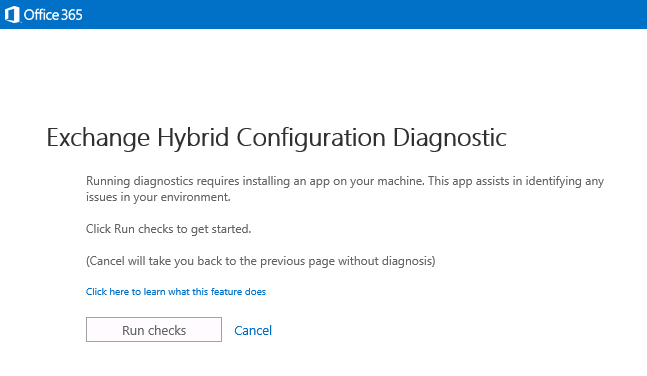
 To make things easier Microsoft team today released the new Automated Hybrid Troubleshooter Tool, "Exchange Hybrid Configuration Diagnostic" which will run diagnostic checks and provide solution to address some of the common failures and also upload the logs to Microsoft Data Center, which can be used by the support personnel for faster troubleshooting.

Microsoft team is planning to add more complex troubleshooting features to the tool in the upcoming days.

Access the Tool here: Exchange Hybrid Configuration Diagnostic


Note: Only IE is supported, if you use other browser you will get the below message.


Once the Tool is successfully Launched on the Machine where the HCW failed it will Run Checks and start the diagnostics.

Review the Official Blog post here for more details : Automated Hybrid Troubleshooting Experience

As always try to use the Tool and share your feedback !!!

Thursday, February 19, 2015

Office Mechanics: Azure AD and Office 365 sign-in updates

Microsoft team recently hosted the Office Mechanics live video series session on Azure AD and Office 365 sign-in updates, This session gives us the first look at extending Office 365 and Azure AD secure authentication into other SaaS services and internal applications. 


Access the video here from the Office Mechanics YouTube channel: First look at Azure AD and Office 365 sign-in updates

Wednesday, February 18, 2015

New Identity and Access Management features added to Office 365!!!

Today Microsoft team made a significant announcement for Office 365 by adding two most awaited features to Office 365 which were earlier part of premium subscription.


Below is the extract from the Official Announcement

"Today we are adding two Identity and Access Management features to the Office 365 subscription, which were previously only available with an additional Azure Active Directory (AD) Premium or Enterprise Mobility Suite subscription. The new features are the Sign in page and Access Panel company branding and cloud user self-service password reset. These two new features are beginning to roll out for Office 365 customers starting today."


Note: Azure AD Self-service password reset is applicable only for Cloud managed accounts and for Accounts managed via On premises, you still need to be using Azure AD premium or Azure Enterprise Mobility Suite subscription.

Also a quick comparison table of Azure AD features and Azure AD usage reports included with Office 365 subscriptions  is provided for reference.

Access the Official blog post here: Sign in page branding and cloud user self-service password reset for Office 365

Keep an eye on the Office 365 Roadmap site, we have more to come soon...

Tuesday, February 17, 2015

Alternative Microsoft Training Options !!!

I recently came across this excellent Ask PFE Blog post written by Dan Cuomo & Scott Simkins | Microsoft Platforms Premier Field Engineers on various Microsoft training options available for everyone.


This post is quite significant in terms of Microsoft learning, which shows us references to most of the vital resources available outside from Microsoft that can help us to learn and do more with the Technology.

Below are few of the top Learning resources referenced and there are more available inside the blog post with clear description and references.


Access the post here: Alternative Microsoft Training Options, Many Free!

Believe this where to post is worth sharing and would like my readers to utilize these resources and take your Learning to the next level. Happy Learning...

Sunday, February 15, 2015

An End-to-end Experience with Groups White Paper

Office 365 new Groups feature started rolling out to customers and some of the Organizations started to use this feature to take their collaboration experience to the next level.


Microsoft team recently published a White Paper on the new Groups feature with Office 365 to provide some deep dive experience for readers to know more and do more with Groups.


Download the White Paper here: An End-to-end Experience with Groups

Along with this, review the below excellent Windows ITPro blog post from our MVP Tony Redmond

Friday, February 13, 2015

MVA Learning : Windows 10 Technical Preview Fundamentals for IT Pros

Windows 10 Technical preview is released, the entire world is testing the preview release and experiencing the latest technology and sharing their reviews in the global community every second, to add to this we now have a new Microsoft Virtual Academy course available on demand for ITPros to know and understand the fundamentals of Windows 10 Technical Preview.


This new course focuses on the below topics,

  • Windows 10 Technical Overview
  • Windows 10 Management and Deployment
  • Windows 10 Security
  • Internet Explorer


You can Register & Access the MVA Course here and add points to your Microsoft Learning : Windows 10 Technical Preview Fundamentals for IT Pros


You can directly access the Course videos from Channel 9 here: Windows 10 Technical Preview Fundamentals for IT Pros

Add-on Bytes:

Microsoft team yesterday announced the the first build of Windows 10 Technical Preview for Phones, this is the current hot topic in the Mobile world. If you are already registered for  Windows Insider Program you can register your device and enjoy the new Mobile experience and share your feedback.


Note: Currently only few selected Microsoft Mobile device models are eligible for this program and soon we can see this list expanding.

More information is available in the Official Announcement : Announcing the first build of Windows 10 Technical Preview for Phones

Download instructions : Download Windows 10 Technical Preview for phones

Wednesday, February 11, 2015

New Support Article:How to migrate mailboxes from one Office 365 tenant to Another

Microsoft team recently published an support article to migrate mailboxes and service settings  from one Office 365 tenant to another in a business-merger scenario.


As per Microsoft guideline, If you have more than 500 users to migrate or a large amount of SharePoint data to migrate, it's a good idea to work with an Office 365 partner.

This is an excellent article the provides step by step walk-through to perform this mailbox migration from one Office 365 Tenant to another.

Access the article here: How to migrate mailboxes from one Office 365 tenant to another

Tuesday, February 10, 2015

Office 2016 Consumer Technical Preview now available !!!

Microsoft team made a significant move recently by making the next version of Office 2016 Consumer Technical preview available for download from Microsoft Connect site.


All we need to do is to sign-in to Connect site agree the NDA and download the test bits and play around. We can expect the Official release in the later half of this year 2015.


Review the ZDNet post below for more details and access the connect site to download and experience the next version of office.

Access here: Microsoft opens Office 2016 preview to more testers