Friday, March 30, 2018

Microsoft 365 Security Training 2018 now Available

Security plays an important role for every Organization and Microsoft 365 which combines the power of Windows 10 Enterprise, Office 365, and Enterprise Mobility + Security leverages the latest security features built-in to the products to protect devices, apps, data, and identities without compromising on productivity.


To understand Microsoft 365 Security features Microsoft team presented a deep dive session during Microsoft Tech Summit 2017/18.

Below are the five modules available in the session
  • Identity and Access Management
  • Threat Protection
  • Information Protection
  • Compliance
  • Security Management

These modules will provide you a clear insight on the Security capabilities available in Microsoft 365, and also you have deep dive demos and hands-on.


Access here : Deep Dive into Microsoft 365 Intelligent Security

In addition to this, Brad Anderson (CVP, Enterprise Mobility) offered a new Microsoft 365 Security training session, providing a comprehensive overview of Microsoft 365 Security offering with an in-depth look at identity-driven security, information protection, threat protection, and security management.
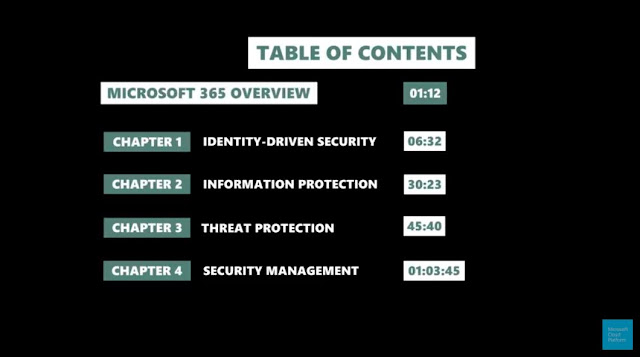

Watch the Session here: Microsoft 365 Security Training 2018

Stay tuned fore more updates...

Friday, March 16, 2018

Microsoft Teams Updates !

Microsoft announced their New Vision for intelligent communications in Office 365 during last year Microsoft Ignite 2017. Where Microsoft Teams is core to their Vision for intelligent communications—bringing together conversations, meetings, files, Office apps, and third-party integrations—to provide a single hub for teamwork in Office 365.


Microsoft Teams is now widely adopted and become the ultimate hub for teamwork. This week marks the First anniversary of the worldwide launch of Microsoft Teams. To advance Microsoft vision for Intelligent Communications, New features are coming later this year and the below Office blogs post covers the updates in detail.

Access here to know more: Microsoft Teams turns 1, advances vision for Intelligent Communications

If you are new and not yet started your Microsoft Teams Journey access this guidance and begin today : Microsoft Teams documentation and practical guidance

Update:

New Free version of Microsoft Teams is now available : Introducing a free version of Microsoft Teams

Update:

Access the new "Teams Adoption hub" to enhance your Organization's Teams Adoption and also a new "Microsoft Teams video learning" is available to begin with Teams.

Stay tuned for more updates...

Azure Strategy and Implementation Guide

If you are new to Microsoft Azure or in the beginning stages of planning a cloud migration, this new e-Book from Microsoft is an essential resource to begin your Journey.


Download here: Azure Strategy and Implementation Guide

Microsoft 365 Admin Center now Available

Microsoft 365 adoption is on the rise, Microsoft 365 enables Organizations at all levels to successfully transform their Workplace into a Modern Workplace and enhances productivity to move forward in this Digital World.


To manage Microsoft 365 services effectively, Microsoft team recently announced the availability of the new Admin Center for Microsoft 365 Enterprise customers. This new Admin center will be a single place for Admins to get started with Microsoft 365 and discover the breadth of management capabilities and experiences available to them.

You can read this Official Microsoft Tech Community post to know more: Introducing the Microsoft 365 Admin Center

Once this new experience is rolled-out to your tenant you can access the same here: admin.microsoft.com

Stay tuned for more updates...

Thursday, March 01, 2018

Attack Simulator for Office 365 Now Available

Microsoft team recently announced a new Attack Simulator for Office 365  in Preview (included in Office 365 Threat Intelligence), if you are a security or global administrator, you can run realistic attack scenarios in your organization. This can help you identify and find vulnerable users before a real attack impacts your bottom line.


Access the Support article here: Attack Simulator (Office 365)

Review the Official Tech Community post to know more: Announcing the Public Preview of Attack Simulator for Office 365 Threat Intelligence   


Wednesday, February 28, 2018

Microsoft 365: A complete solution that brings together Office, EMS & Windows e-Book

Microsoft team recently published a new e-Book to learn and understand the power of Microsoft 365, which combines the productivity of Office 365 with the protection of Enterprise Mobility + Security (EMS) into a complete, intelligent solution that is built for the new culture of work and assist your Organization Journey towards Digital transformation.


Download here: Microsoft 365: A complete secure solution that brings together Office 365 & Microsoft EMS

Slide Deck: Modern Workplace with Microsoft 365

Earlier this Month I delivered a session for C# Corner Bangalore Chapter Meet for "Workshop on Digital Transformation and Office 365" on the following topic: "Modern Workplace with Microsoft 365


Sharing the slide deck presented in the session here: Modern Workplace with Microsoft 365

Sunday, December 31, 2017

Azure Information Protection End user Adoption Guide

Azure Information Protection End user adoption guide is now available.


Download here: Azure Information Protection End user adoption guide

Add-on Read:

Read the latest blog post below and watch the Microsoft Mechanics session to know the recent innovations with Azure Information Protection.


Blog post : Announcing New information protection capabilities across devices, apps, on-premises and the cloud


Monday, December 25, 2017

Get to know Microsoft 365 Powered Device

Most Organizations today are transforming their Traditional workplace to Modern workplace and embracing Digital transformation. Microsoft 365 is a complete, integrated solution that can support you in this Journey and empower your workforce to be more agile, secure and productive.


This blog post is on the new “Microsoft 365 Powered device”, it’s a device running Windows 10, with Office 365 ProPlus deployed, and managed by Enterprise Mobility + Security (EMS).


Microsoft introduced this new “Microsoft 365 Powered device” during Microsoft Ignite 2017 and published an official blog post with detailed information, and showcased the new experience in a Microsoft Mechanics theater session to customers.


Watch the Microsoft Mechanics video here: Deploying andmanaging Microsoft 365 powered devices

Also during the Microsoft Ignite 2017 event, Brad Anderson MSFT CVP  EM+S delivered a session showcasing the full potential of the aforesaid experience covering the new Modern Management experience.


Recently during Microsoft Tech Summit 2017Microsoft team published a deep dive guidance in to Microsoft 365 deployment to help customers to begin their deployment journey.


Watch this Microsoft Mechanics session presented by Jeremy Chapman MSFT, Director Microsoft 365 to begin, where he explains the new Microsoft 365 Powered devices deployment and management in a nut shell: Microsoft 365 Powered Devices –Everything you need to know in 6-minutes


Access the guidance Modules here: Deep Dive into Microsoft365 Deployment

If you have attended the Tech Summit 2017 event you can sign-in and utilize the Hands-on labs available on-demand.

Also you now have the new Microsoft 365 powered device lab kit, which is an updated version of the Windows 10 Deployment and Management lab kit. Use this kit for POC and plan your deployment.


Download the lab kit here: Microsoft 365 powered device lab kit

If you are part of the Microsoft Tech Community follow the Microsoft 365 and Windows 10 Community for latest updates.

Make use of the available resources and introduce the new Microsoft 365 Powered devices in to your Organization and enhance your end users productivity, and Simplify the Admin experience.

Be sure to share your valuable feedback to Microsoft.

Sunday, December 24, 2017

Understand the journey from Skype for Business to Microsoft Teams Training

Microsoft team recently published a new training documentation to understand the journey from Skype for Business to Microsoft Teams inline with their New Intelligent Communications Vision and explain the future of Skype for Business and Teams.


The key learnings of this tutorial are:
  • Understand the Intelligent communications vision
  • Understand the journey from Skype for Business Online to Teams
  • Understand what actions should be started today

Sunday, December 10, 2017

New Azure Free Account !

Microsoft team recenlty launched the New Azure free Account. This Azure free account includes $200 credit to spend for 30 days and free 25+ Azure products for 12 Months.


Below FAQ article clearly outlines the available free products with complete details on this topic.

Azure Free Account FAQ

Also view the Azure Friday session for more details: Azure Free Account

Office 365 Advanced Threat Protection for SharePoint Online, OneDrive For Business, and Teams reaches GA !

Office 365 Advanced Threat Protection is available for Exchange for quite some time now and recently Microsoft extended the ATP capabilities to files in SharePoint Online, OneDrive for Business, and Microsoft Teams.

Microsoft last week announced the General Availability of Office 365 ATP for SharePoint Online, OneDrive for Business, and Microsoft Teams.


You can read the Official Announcement here: GA of Office 365 Advanced Threat Protection for SharePoint Online, OneDrive For Business, and Teams

Also Read: Office 365 Advanced Threat Protection for SharePoint, OneDrive and Microsoft Teams now available

Note: Advanced Threat Protection for SharePoint, OneDrive, and Microsoft Teams is not available on-premises. Advanced Threat Protection is included in Office 365 Enterprise E5. If your organization is using another Office 365 Enterprise subscription, Advanced Threat Protection can be purchased as an add-on. (As a global admin, in the Office 365 admin center, choose Billing > Add subscriptions.)

Follow the instructions provided in the support article here to enable Enable ATP and secure your Organization.

Hybrid Modern Authentication (HMA) is now available for Exchange On-Premises and Skype for Business

Hybrid Modern Authentication (HMA) is now available for Exchange On-Premises and Skype for Business. Hybrid Modern Authentication provides users ability to access On-premises applications using Auth tokens obtain from the cloud (Azure AD). HMA allows to leverage Azure AD capabilities like MFA, Conditional Access across both On premises and Cloud seamlessly.

You can read this blog post to know how HMA works: Deep Dive: How Hybrid Authentication Really Works

Below are the Official Posts on the HMA availability for Exchange On premises and Skype for Business.

Exchange On-Premises


Read here: Announcing Hybrid Modern Authentication for Exchange On-Premises

Skype for Business


Read here: Hybrid Modern Authentication for Skype for Business   

Following are the updates required for HMA to get enabled for Exchange On-premises and Skype for Business.
  • Skype for Business Server (SfB) 2015 May 2017 cumulative update supports Hybrid Modern Authentication (HMA).
  • Hybrid Modern Authentication (HMA) is available with next set of Cumulative updates for Exchange 2013 and 2016 that's CU8 for Exchange Server 2016, and CU19 for Exchange Server 2013.
Read the support article provides the complete set of prerequisites here: Hybrid Modern Authentication overview and prerequisites for using it with on-premises Skype for Business and Exchange servers

Stay tuned for more updates...

First Release becomes Targeted Release in Office 365

To experience the latest features released, updates and changes made to Office 365 Service most Organizations opt in for First release program to validate the features and provide feedback to Microsoft Product team before its made available as a Standard release.

Microsoft team recently renamed the First Release Program as Targeted release and published the support article that covers this change with key updates.


Access the support article here: Set up the Standard or Targeted release options in Office 365

Official Tech Community Announcement here: Enable “Targeted Release” in Office 365 to receive updates first (formerly known as "First Release")

Its advisable to opt in for Targeted release in the Test tenant if you have a large user base, or opt in only for selected users in the Primary tenant if no Test tenant is available.

Sunday, November 26, 2017